Collectord scrapes the Prometheus metrics that most OpenShift control plane components expose, and forwards the values to Splunk Enterprise or Splunk Cloud. Use this page to change a default scrape, add one of your own, or choose the index the metrics go to.
Out of the box, Collectord scrapes the Kubelet, the API server, the scheduler, the controller manager, etcd and the cluster DNS. On most clusters you don’t need to change anything to start seeing these metrics.
Your own workloads work the same way: Collectord can scrape and forward any application that exposes a Prometheus endpoint.
Forwarding metrics from Pods
To scrape metrics from your own pods, annotate the pod instead of editing the Collectord ConfigMap. See Forwarding Prometheus metrics for the full set of collectord.io/prometheus.* annotations.
Where the scrapes run
Available since Collectord version26.10Collectord’s DaemonSet runs on the nodes, masters included. Each Collectord instance scrapes what runs on its own node.
Collectord finds a control-plane component by its pod. An [input.prometheus::<name>] section names a label selector (podSelector) and a namespace (podNamespace), and Collectord scrapes each matching pod on its node. OpenShift runs the API server, the scheduler and the controller manager as static pods on the host network, and Collectord tries such a pod at the loopback address first.
A section’s endpoints are the fallback. Collectord scrapes them on a node where no matching pod runs, limited to the nodes nodeSelector matches.
The shipped inputs select node-role.kubernetes.io/master rather than the control-plane label, which masters installed before OpenShift 4.12 may lack. With Helm, an input of your own that sets controlPlaneOnly: true gets the same selector, from the controlPlaneNodeSelector value.
Put a Prometheus input of your own in:
002-daemonset.conf- the DaemonSet, on each node it runs on. Use it for anything the node can reach: a node exporter, a component found by its pod.004-addon.conf- a single Deployment, once per cluster. Use it for endpoints you reach through the cluster network or outside the cluster, like an etcd cluster on dedicated hosts.
Set type = openshift_prometheus on it, because the app’s pages read that source type alone.
Before 26.10, a second DaemonSet ran on the master nodes with its own
003-daemonset-master.conf, and the control-plane inputs lived there. See Upgrade from 26.04 to 26.10 to move your settings.The app’s pages also read the generic
prometheussource type before 26.10: the one a section without atype(or withtype = prometheus) sends.
Default configuration
| Input | Runs on | Found by | Endpoint |
|---|---|---|---|
kubelet | each node Collectord runs on | the node’s IP | https://<node IP>:10250/metrics |
kubernetes-api | masters | app=openshift-kube-apiserver in openshift-kube-apiserver | port 6443 |
scheduler | masters | app=openshift-kube-scheduler in openshift-kube-scheduler | port 10259 |
controller | masters | app=kube-controller-manager in openshift-kube-controller-manager | port 10257 |
etcd | masters | the node-role.kubernetes.io/master label | the node’s address, port 9979, else 9978 |
coredns | nodes running the cluster DNS | dns.operator.openshift.io/daemonset-dns=default in openshift-dns | port 9154 |
Each input forwards the metrics the dashboards read (its whitelist) every 60 seconds, as the openshift_prometheus source type, with the input’s name as its source. The full sections are in the reference configuration.
To change an input, set it in the Helm values under collectord.configuration.inputs.prometheus.<name>. With the manifest, set it under [input.prometheus::<name>] in 002-daemonset.conf. For example, turn off the etcd scrape where your security policy doesn’t let an agent read etcd’s certificates:
1collectord:
2  configuration:
3    inputs:
4      prometheus:
5        etcd:
6          disabled: true
Kubelet
Collectord scrapes the Kubelet at the node’s IP with its service-account token, which the ClusterRole authorizes through nodes/metrics. To verify the Kubelet’s certificate, point certPath at OpenShift’s kubelet-serving CA and set insecure: false.
Before 26.10, Collectord scraped the Kubelet at the loopback address,
https://127.0.0.1:10250/metrics.
API server, scheduler and controller manager
Each master runs one of each, and the Collectord pod on that master scrapes its own, so the dashboards show every instance apart.
Collectord verifies their certificates:
- the API server’s against the service-account CA, under the name
kubernetes; - the scheduler’s and the controller manager’s against the service CA, under their Service names (
scheduler.openshift-kube-scheduler.svc,kube-controller-manager.openshift-kube-controller-manager.svc).
On a master where it finds no pod, Collectord falls back to the API server’s Service address, and to https://127.0.0.1:10259 and https://127.0.0.1:10257 for the scheduler and the controller manager.
Before 26.10, Collectord scraped the API server through its Service address from every master. The Service hands each request to whichever API server it picks, so the per-master charts mixed the instances. Collectord scraped the scheduler and the controller manager without verifying their certificates.
etcd
Collectord scrapes etcd on each master at the node’s own address, on port 9979 and then 9978. It presents etcd’s peer certificate, which it reads from the master’s static-pod resources (/etc/kubernetes/static-pod-resources/etcd-certs, mounted under /rootfs).
Most of etcd’s gRPC series stay at zero, so the section’s skipZeroCounters sends each one only once it first rises.
Cluster DNS
Available since Collectord version26.10Collectord scrapes the cluster DNS by default, for the CoreDNS dashboard under Cluster > System Components.
It reaches each dns-default pod through its kube-rbac-proxy on port 9154 with the service-account token, and verifies its certificate against the service CA. The scrape comes from the pod’s own node, and the NetworkPolicy that OpenShift 4.22 puts in front of that port admits it.
Endpoint discovery
Available since Collectord version26.04.2Some components don’t run on the nodes Collectord runs on, but are reachable through a Service. Discover those from the addon instead. Define the section in 004-addon.conf with one of these keys, then describe the scrape with port (or portName), scheme, and path:
endpointSlice = <name>.<namespace>fans out to every pod, throughdiscovery.k8s.io/v1.EndpointSlice. Collectord queries the slices labelledkubernetes.io/service-name=<name>, keeps the ready (non-terminating) IPv4/IPv6 addresses, and starts one scrape pipeline per address. Each pipeline’s eventhostis the discovered endpoint address. Omit.<namespace>to aggregate slices across all namespaces.service = <name>.<namespace>scrapes the Service’s ClusterIP once per interval, and kube-proxy load-balances each scrape to one backing pod. Every scrape carries the ClusterIP ashost.endpoint = <url>scrapes a literal URL, with no Kubernetes discovery. With severalendpoint.Nvalues, Collectord tries them in order until one responds.
Set only one discovery key per input stanza. If you set more than one, Collectord picks endpointSlice > service > endpoint and logs a warning naming the ignored keys. To get two behaviors at once, use two separate [input.prometheus::...] stanzas.
For example, to scrape the controller manager through the Service OpenShift creates for it, in place of the controller input:
 1[input.prometheus::controller-via-discovery]
 2disabled = false
 3type = openshift_prometheus
 4source = controller
 5interval = 60s
 6endpointSlice = kube-controller-manager.openshift-kube-controller-manager
 7port = 10257
 8scheme = https
 9path = /metrics
10tokenPath = /var/run/secrets/kubernetes.io/serviceaccount/token
11certPath = /var/run/secrets/kubernetes.io/serviceaccount/service-ca.crt
12caName = kube-controller-manager.openshift-kube-controller-manager.svc
Turn off the controller input when you do, or Collectord sends the metrics twice. To list the Services your cluster has, run oc get service -A | grep -E 'controller-manager|scheduler'.
Breaking change in 26.04.2
The legacy
endpoint = endpoint-http://<svc>:<port>/pathsyntax is removed, with itsendpoint-https://,service-http://andservice-https://forms. The old resolver built an invalid kube-apiserver URL and silently returned no targets. If you copied that pattern from an earlier revision of these docs, no scrapes were happening: switch to the keys above. RBAC also changed, so re-apply the manifest to grantdiscovery.k8s.io/endpointslices.
Metrics format (Splunk Index Type = Events)
Prometheus defines several metric types. Collectord keeps each metric’s type, so you can search and aggregate accordingly.
Every metric event in Splunk carries:
metric_type- one of the Prometheus metric types.metric_name- the name of the metric.metric_help- the metric’s definition, included only whenincludeHelp = true.metric_label_XXX- one field per Prometheus label on the metric.seed- a unique value per host and metric collection.
The numeric fields depend on the type:
counterv- current counter valued- the difference with a previous values- period for which this difference is calculated (in seconds)p- (deprecated) period for which this difference is calculated (in nanoseconds)
summaryandhistogramv- valuec- counter specified for thissummaryorhistogrammetric
All others
v- value
With includeHelp on, this search lists every metric Collectord forwards, with its description. Run it to see what’s available before you build a dashboard:
1sourcetype=openshift_prometheus
2| stats latest(_raw) by source, metric_type, metric_name, metric_help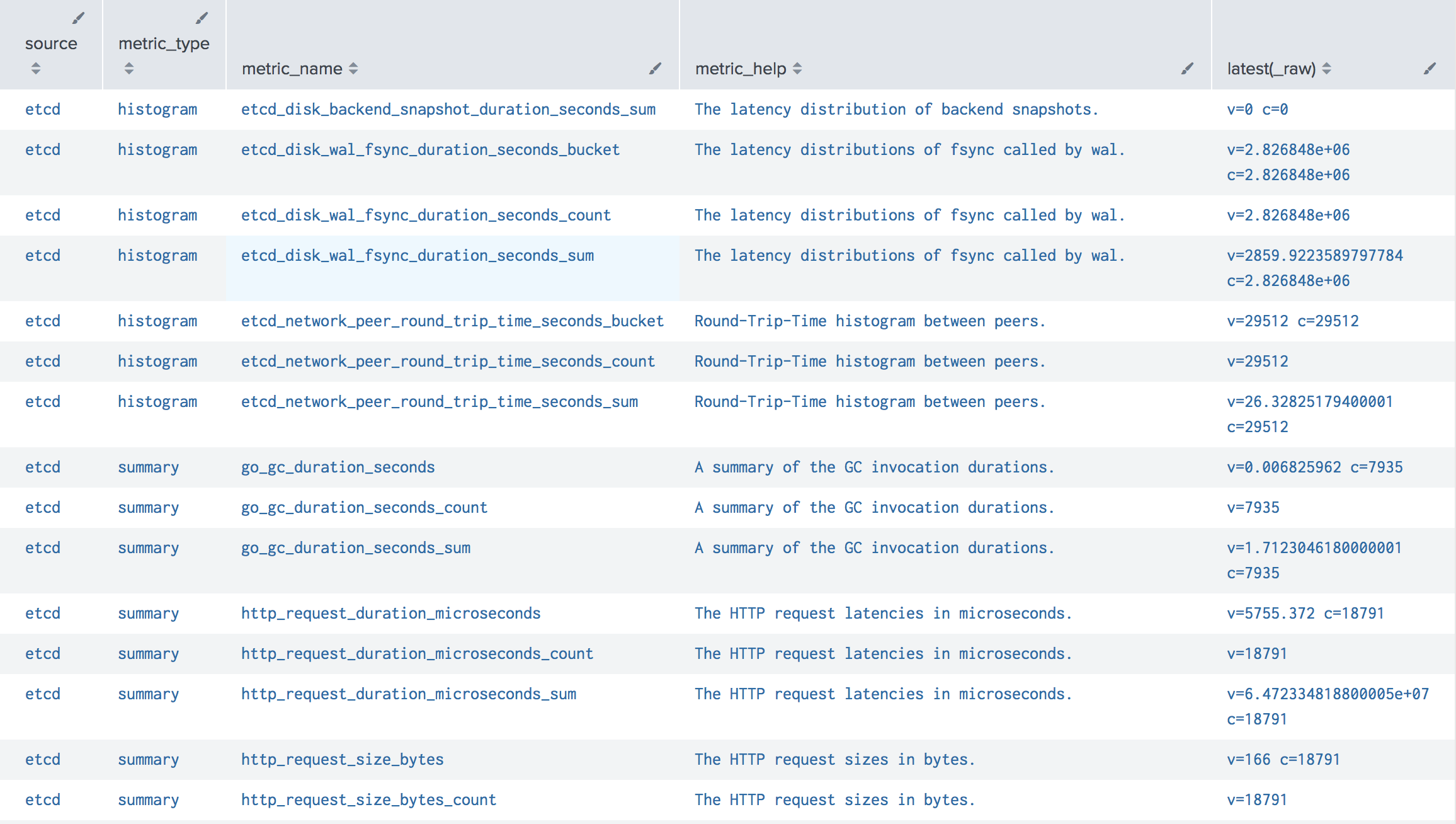
Metrics format (Splunk Index Type = Metrics)
Available since Collectord version5.24To send a scrape to a Splunk metrics index instead of an events index, set indexType = metrics on its [input.prometheus::<name>] section, or annotate the pod with collectord.io/prometheus.1-indexType=metrics. [general] defaultIndexType = metrics does the same for every scrape that sets no indexType of its own.
Since 26.10, indexType = both sends every sample to both indexes, so you can move your searches over without a gap.
Two more keys choose where the metrics go:
metricsIndexnames the metrics index. You can also setdefaultMetricsIndexonce on the[output.splunk]output.metricsOutputsends the metrics through another output, whose HEC token allows metrics indexes. A token whose allowed indexes are events indexes rejects them.
A metrics-index record packs every measurement of one label set. Its dimensions have dotted names, the way Splunk’s Analytics Workspace groups them: a Prometheus label is metric.label.<label>, and Collectord’s own fields are openshift.namespace, openshift.pod.name and so on.
Before 26.10, each sample was a record of its own, the labels were
metric_label_<label>dimensions, and the records carriedmetric_typeandmetric_help. A search written against those dimensions returns nothing for the records sent after the upgrade until it uses the dotted names.