Collectord can stream the Kubernetes API server’s object changes into Splunk: every change to a Deployment, every new ConfigMap, every Pod that comes and goes. Use it for a full audit trail of what runs in your cluster, for OpenShift Dashboard-style views and for alerting on configuration drift.
By default, Collectord forwards events plus Pod, Node, ResourceQuota, and ClusterResourceQuota objects. Other kinds (DeploymentConfigs, Deployments, ConfigMaps, Secrets, and so on) are opt-in: add an [input.kubernetes_watch::*] stanza per kind.
Configuration
You configure object streaming in 004-addon.conf of the Collectord ConfigMap. Each [input.kubernetes_watch::*] stanza defines one kind of object to watch, how often to refresh the full list, and where the data lands in Splunk.
The example below watches Pods, Deployments, and ConfigMaps. It refreshes the full list every 45 minutes (refresh = 45m, the shipped default) and streams individual changes immediately:
 1[input.kubernetes_watch::pods]
 2
 3# disable events
 4disabled = false
 5
 6# Set the timeout for how often watch request should refresh the whole list
 7refresh = 45m
 8
 9apiVersion = v1
10kind = Pod
11namespace =
12
13# override type
14type = openshift_objects
15
16# specify Splunk index
17index =
18
19# set output (splunk or devnull, default is [general]defaultOutput)
20output =
21
22# exclude managed fields from the metadata
23excludeManagedFields = true
24
25
26[input.kubernetes_watch::deployments]
27
28# disable events
29disabled = false
30
31# Set the timeout for how often watch request should refresh the whole list
32refresh = 45m
33
34apiVersion = apps/v1
35kind = Deployment
36namespace =
37
38# override type
39type = openshift_objects
40
41# specify Splunk index
42index =
43
44# set output (splunk or devnull, default is [general]defaultOutput)
45output =
46
47# exclude managed fields from the metadata
48excludeManagedFields = true
49
50
51[input.kubernetes_watch::configmap]
52
53# disable events
54disabled = false
55
56# Set the timeout for how often watch request should refresh the whole list
57refresh = 45m
58
59apiVersion = v1
60kind = ConfigMap
61namespace =
62
63# override type
64type = openshift_objects
65
66# specify Splunk index
67index =
68
69# set output (splunk or devnull, default is [general]defaultOutput)
70output =
71
72# exclude managed fields from the metadata
73excludeManagedFields = true
To stream other kinds of objects, look them up in the Kubernetes API reference and copy the matching apiVersion and kind. Core group objects use apiVersion: v1; other groups follow the group/version pattern, for example apps/v1. To scope a watch to a single namespace instead of the whole cluster, set namespace.
Modifying objects
Some objects carry sensitive data. Secrets are the obvious example, but ConfigMaps and pod specs often contain credentials too. The modifyValues. modifier rewrites or strips fields before Collectord forwards them, so nothing sensitive lands in Splunk in the clear.
This Secrets watch hashes every value under object.data and drops kubectl-style annotations. The last-applied-configuration annotation tends to leak the original Secret values, so you want it gone:
 1[input.kubernetes_watch::secrets]
 2disabled = false
 3refresh = 45m
 4apiVersion = v1
 5kind = Secret
 6namespace =
 7type = openshift_objects
 8index =
 9output =
10excludeManagedFields = true
11# hash all fields before sending them to Splunk
12modifyValues.object.data.* = hash:sha256
13# remove annotations like last-applied-configuration not to expose values by accident
14modifyValues.object.metadata.annotations.kubectl* = remove
To watch Secrets, grant Collectord access to them: see the ClusterRole rules below.
The path syntax after modifyValues. is a dotted path with simple glob support: * is allowed at the start or end of any segment. The right-hand side is either remove or hash:{hash_function}, with the same hash functions as log annotations.
Filtering objects
Available since Collectord version5.21When you only care about some namespaces, such as your application namespaces but not the openshift-* system namespaces, use namespace whitelists or blacklists on the input. Both take a regex matched against the openshift_namespace field:
1[input.kubernetes_watch::pods]
2# You can exclude events by namespace with blacklist or whitelist only required namespaces
3# blacklist.openshift_namespace = ^namespace0$
4# whitelist.openshift_namespace = ^((namespace1)|(namespace2))$
To stream every Pod except those in namespace0:
1[input.kubernetes_watch::pods]
2blacklist.openshift_namespace = ^namespace0$
Or to stream only Pods from namespace1 and namespace2:
1[input.kubernetes_watch::pods]
2whitelist.openshift_namespace = ^((namespace1)|(namespace2))$
Collectord doesn’t set
kubernetes_namespaceon OpenShift. A whitelist on that key from the Kubernetes docs drops every object, and a blacklist on it does nothing.
The lists also judge Nodes, Namespaces and other cluster-scoped kinds, which have no namespace. So a whitelist.openshift_namespace on a Node or Namespace watch keeps out every object.
Before 26.10, the lists did not apply to cluster-scoped kinds.
ClusterRole rules
Collectord can’t watch what it can’t read. The ClusterRole grants get, list and watch on the kinds the shipped watches and the app need: Pods, Nodes, Namespaces, workloads, Jobs and the like. It doesn’t grant them on ConfigMaps, which the example above watches. Add a rule for them to the rules of the ClusterRole in collectorforopenshift.yaml:
1- apiGroups: [""]
2  resources: ["configmaps"]
3  verbs: ["get", "list", "watch"]
With the Helm chart, rules go under collectord.clusterRole.rules in your values, where the chart already lists the DeploymentConfig and ClusterResourceQuota rules. Helm replaces a list instead of merging it, so keep those two and add yours after them:
 1collectord:
 2  clusterRole:
 3    rules:
 4    - apiGroups: ["apps.openshift.io"]
 5      resources: ["deploymentconfigs"]
 6      verbs: ["get", "list", "watch"]
 7    - apiGroups: ["quota.openshift.io"]
 8      resources: ["clusterresourcequotas"]
 9      verbs: ["get", "list", "watch"]
10    - apiGroups: [""]
11      resources: ["configmaps"]
12      verbs: ["get", "list", "watch"]
A Secrets watch needs the same rule for secrets. The ClusterRole grants only get on Secrets, for the one Secret a SplunkOutput names. A watch needs list and watch on every Secret in the cluster, so that grant is yours to make deliberately.
Before 26.10, the ClusterRole granted
get,listandwatchon Secrets, so a Secrets watch needed no new rule.
Applying the changes
After you edit the ConfigMap and ClusterRole, restart the addon pod (named something like collectorforopenshift-addon-XXX) so it picks up the new configuration. Deleting the pod is enough: the Deployment recreates it.
Searching the data
With the configuration above, Collectord re-sends every object every 45 minutes and streams any change in between immediately. If you use join or populate lookups, make your search window longer than refresh: an hour is a safe default for a 45-minute refresh. With the Helm chart, a shipped watch’s interval is collectord.configuration.inputs.kubernetesWatch.<name>.refresh in your values.
Before 26.10, the shipped watches used
refresh = 10m, and a 12-minute window was enough.
The source name
Each event’s source follows the format /openshift/{namespace}/{apiVersion}/{kind}. The namespace here is the one used in the API request, taken from the input config, not the namespace of the individual object. The apiVersion and kind come from the input too.
Attached fields
Each event carries openshift_namespace and openshift_node_labels. They let you filter by namespace and, if your nodes carry a cluster label, by cluster.
Event format
Collectord forwards objects wrapped in the Kubernetes watch object: each event has an object field plus a type of ADDED, MODIFIED, or DELETED.
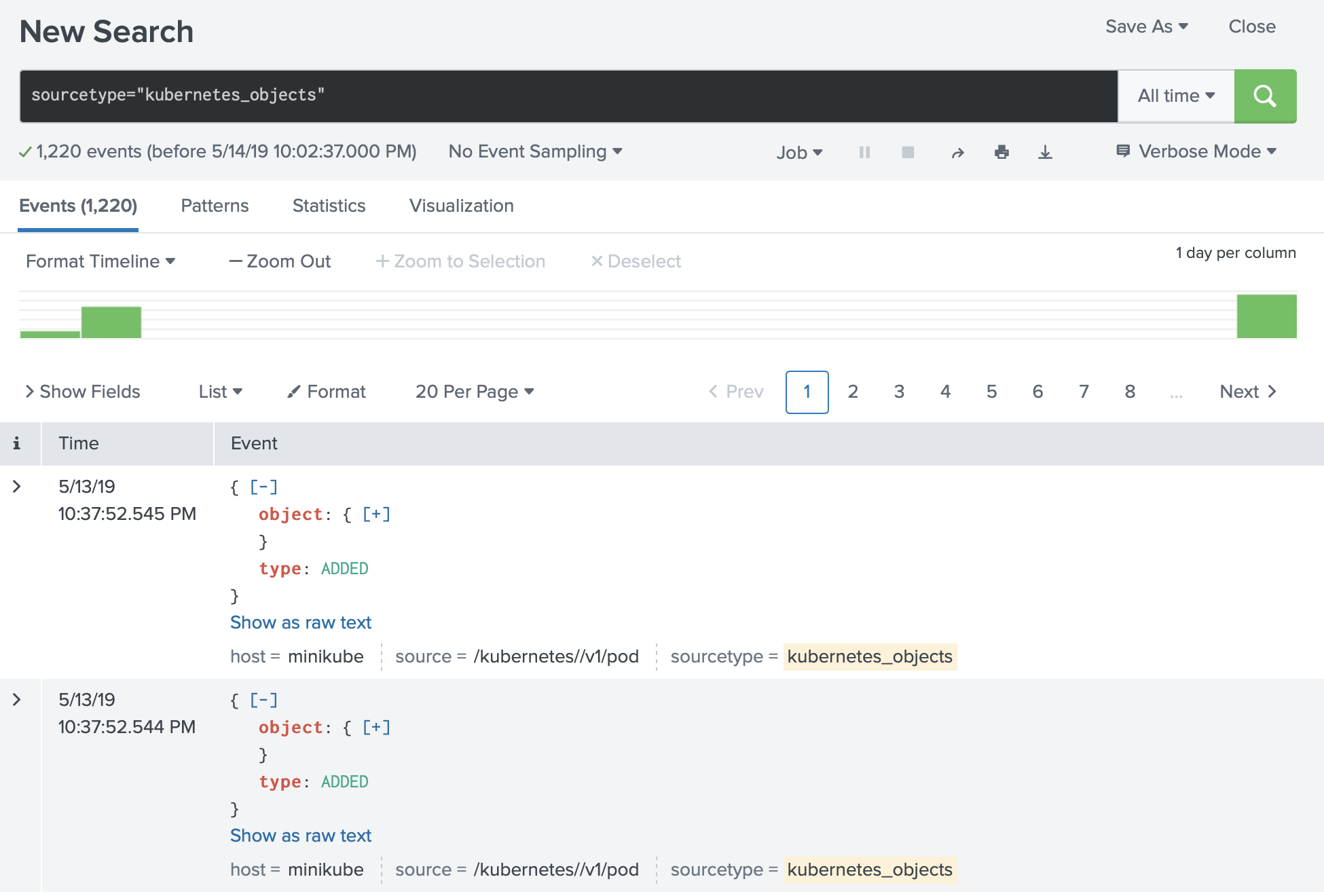
Searching the data
The same object can show up several times in one window: once per modification, plus the periodic full refresh. Group by the object’s unique identifier and take the latest version per group:
1sourcetype="openshift_objects" source="/openshift//v1/pod" |
2spath output=uid path=object.metadata.uid |
3stats latest(_raw) as _raw, latest(_time) as _time by uid, openshift_namespace |
4spath output=name path=object.metadata.name |
5spath output=creationTimestamp path=object.metadata.creationTimestamp |
6table openshift_namespace, name, creationTimestamp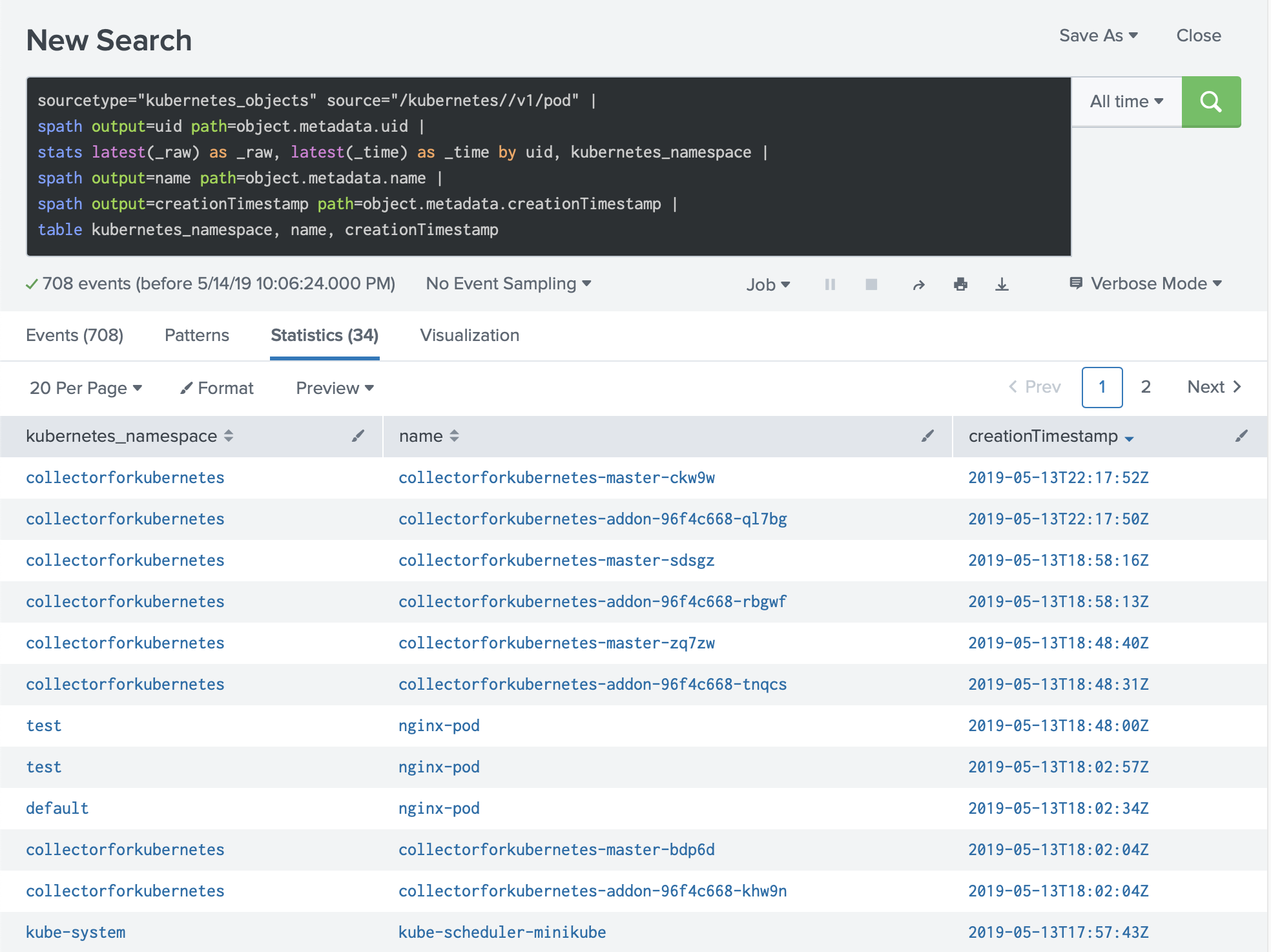
Example. Extracting limits
A more involved search extracts CPU, memory, and GPU requests and limits per container:
 1sourcetype="openshift_objects" source="/openshift//v1/pod" |
 2spath output=uid path=object.metadata.uid |
 3stats latest(_raw) as _raw, latest(_time) as _time by uid, openshift_namespace |
 4spath output=pod_name path=object.metadata.name |
 5spath output=containers path=object.spec.containers{} |
 6mvexpand containers |
 7spath output=container_name path=name input=containers  |
 8spath output=limits_cpu path=resources.limits.cpu input=containers |
 9spath output=requests_cpu path=resources.requests.cpu input=containers |
10spath output=limits_memory path=resources.limits.memory input=containers |
11spath output=requests_memory path=resources.requests.memory input=containers |
12spath output=limits_gpu path=resources.limits.nvidia.com/gpu input=containers |
13spath output=requests_gpu path=resources.requests.nvidia.com/gpu input=containers |
14table openshift_namespace, pod_name, container_name, limits_cpu, requests_cpu, limits_memory, requests_memory, limits_gpu, requests_gpu