26.10The Alert Catalog is where Monitoring OpenShift alerts come from. You pick from 117 templates, scope them to your clusters and namespaces (projects), adjust them, and create them as saved searches you own.
Instead of one fixed set of alerts that fires the same way for every cluster, each team gets the alerts it acts on, for the projects it runs. Open the catalog from the app menu under Setup › Alert Catalog.
How the page works
The page first looks at your deployment with your own searches:
- which data Collectord sends: container and host logs, node, container and process stats, the control plane’s Prometheus metrics, OpenShift events and objects, audit logs, and Collectord’s own metrics;
- whether your stats go to the events index or the metrics index;
- which clusters and namespaces reported in the last 24 hours;
- whether you may create alerts in the app (the
schedule_searchcapability).
A template whose data is missing says what it needs. To hide those templates, and the ones you already created, turn on Only templates this deployment can install.
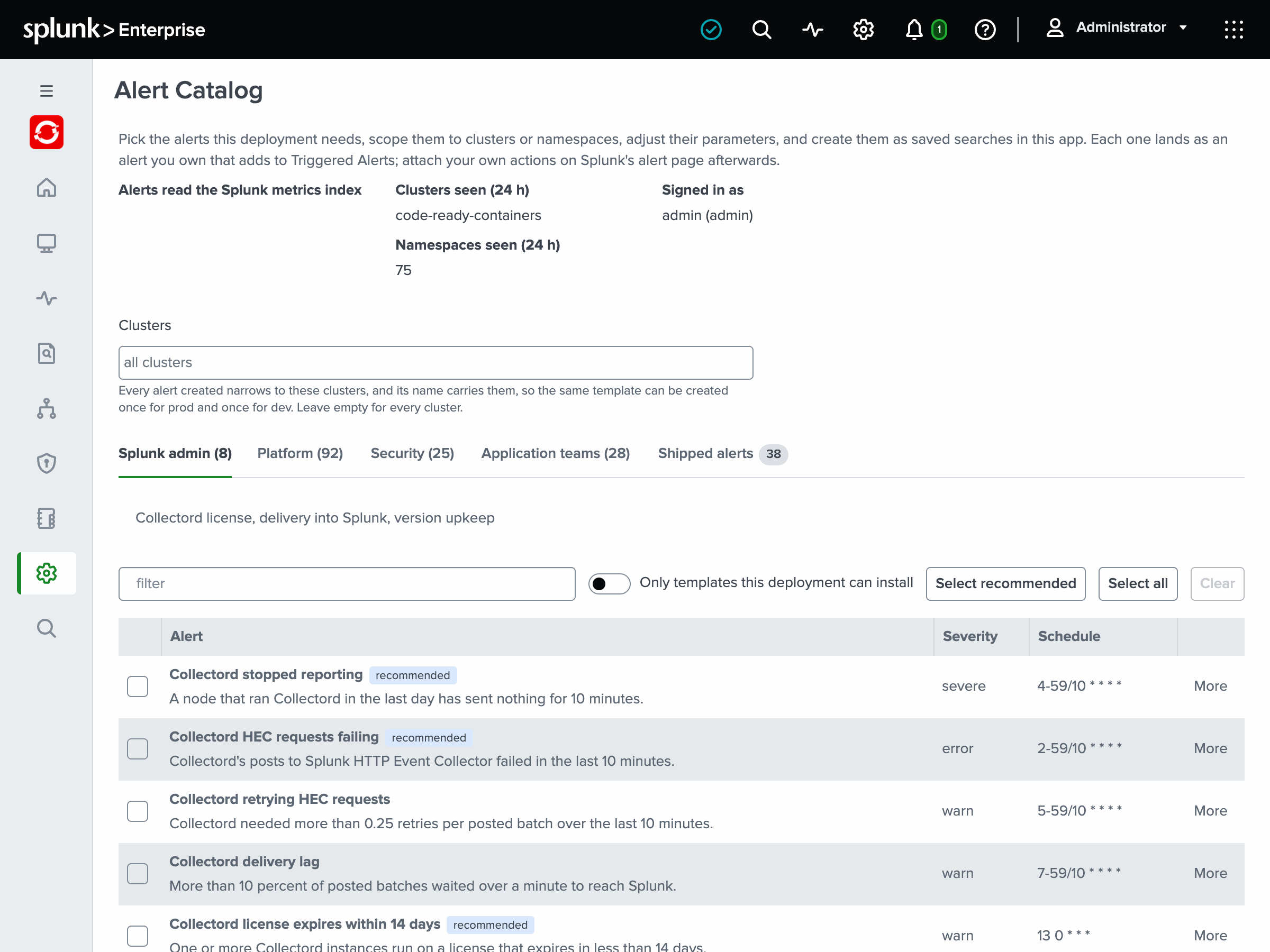
The templates are grouped on four tabs by who acts on them:
- Splunk admin: Collectord’s license, its delivery into Splunk, and version upkeep.
- Platform: Collectord on the nodes, the control plane and etcd, the nodes and their kernel, storage, and cluster-wide workloads.
- Security: the API server audit logs, pod posture, and what runs in the cluster.
- Application teams: pods, containers and processes, scoped to namespaces.
To create alerts:
- Optionally, pick the Clusters the alerts cover, or leave it empty for every cluster. Each alert you create narrows to those clusters and carries them in its name, so you can create the same template once for
prodand once forstaging. A cluster is thefields.openshift_clustervalue each Collectord sends: see Multiple clusters. - Optionally, pick Your namespaces on the Application teams tab. Every template that takes namespaces, on any tab, is created for those projects and carries them in its name. So each team gets its own copy, for example
OpenShift: Pod crash looping [cluster prod; namespace payments]. A template’s own namespace choice under More overrides this pick. - Select the templates, or Select recommended for the ones on the open tab worth having everywhere.
- Under More, adjust a template’s parameters: a threshold, a namespace list, a pattern of names to leave out.
- Click Create. Each template becomes a saved search in the Monitoring OpenShift app, which adds to Triggered Alerts and carries no other action. Attach notifications, such as email, a webhook or your paging tool, on Splunk’s alert page, linked from the results.
An alert runs with its creator’s index access, and anyone who can open it can open its results, whatever indexes their own role may search. So each alert starts private to the user who creates it. Then it is shared with the roles an admin chose under Alert Catalog: who sees the alerts on Setup › Configuration: none until an admin chooses.
When you create alerts, you can pick other roles for them under Alerts created now are visible to. An installed alert’s details say who can open it. Editing and sharing are limited:
- Besides its owner, only
adminandsc_adminmay edit a shared alert. - Sharing an alert needs write access to the app’s objects, or the
admin_all_objectscapability. - Choosing the app’s roles needs
admin_all_objects.
Every template that reads stats or Prometheus metrics has two bodies, one for the events index and one for the metrics index. The page installs the one that matches the dashboards chosen on Setup › Configuration (see Metrics index). A template over logs, events, objects or the audit logs has one body, which reads the events index either way.
An installed alert carries its template id and version in its description, so the page recognizes it later. When a newer app version changes the template, the page offers an update.
The update keeps the parameter values the alert was created with, and your actions, severity and throttling. If you edited its search or schedule since, the page shows both versions and lets you keep yours.
Templates
The thresholds below are the defaults; each one is a parameter under More.
Splunk admin
- Collectord stopped reporting (recommended): a node that ran Collectord in the last day has sent nothing for 10 minutes. The DaemonSet pod is gone, stuck or cannot reach Splunk, and every other alert on that node is blind. The addon reports as host
(addon). The alert fires once an hour per node while the silence lasts, for up to a day. - Collectord HEC requests failing (recommended): Collectord’s posts to the HTTP Event Collector failed in the last 10 minutes, per node, output and status class.
- Collectord retrying HEC requests: more than 0.25 retries per posted batch over the last 10 minutes, about one post in five failing before it went through.
- Collectord delivery lag: more than 10 percent of posted batches waited over a minute to reach Splunk.
- Collectord license expires within 14 days (recommended), Collectord license checks failing (recommended), Collectord version outdated and Collectord license overuse (recommended).
- The checks template fires when a Collectord instance could not reach the license server for a day, or could not verify its answers for an hour. It also fires on a license the server rejected, or one that expired over two days ago.
- Overuse compares the licensed units Collectord reports with what the license allows: nodes, or CPU cores for a license that counts cores.
Platform
- Collectord on the nodes.
- Node without a collector (recommended) compares the cluster’s Node objects with the nodes Collectord reports from. It catches a node that never got a collector: a taint the DaemonSet does not tolerate, an image that fails to pull on a new node pool. Windows nodes are left out.
- Collectord could not parse or had to truncate events and Collectord’s extraction pattern is not matching (more than 10 percent of a container’s lines in an hour) read Collectord’s error tags on the events it forwards. Collectord logged warnings or errors reads its own warnings, and Collectord node diagnostics alarm the node checks it runs (reboot required, CPU vulnerability, low entropy).
- Control plane presence. Kubernetes API server (kube-apiserver) not reporting, Controller manager not reporting, Scheduler not reporting, Kubelet not reporting and etcd member not reporting, all recommended. Each fires when a component that published metrics on a host in the last day has been silent for 10 minutes, while that host’s Collectord still reports.
- API server.
- API server 5xx ratio (recommended): more than 5 percent of at least 100 requests failed with a 5xx in 5 minutes.
- API server request latency: a verb and resource pair averaged more than 1 second per request over 5 minutes. It is the mean, since Collectord doesn’t collect the histogram buckets a percentile needs. Watch, list, connect and proxy requests are left out.
- Client certificate presented to the API server expires within 2 days (recommended): a kubelet, controller or user still authenticates with a client certificate that has between one and two days left. It is not about the API server’s own serving certificate. OpenShift renews its own certificates close to expiry: every node’s multus and OVN client certificates live a day. So only that band counts, and a certificate whose rotation broke passes through it with a day to go.
- The group also has API server terminating requests (20 percent), API server audit backend errors, Kubelet requests to the API server failing (5 percent), CoreDNS panics (from the cluster DNS, the
dns-defaultpods) and Control plane components run different OpenShift versions.
- etcd. The thresholds follow the etcd mixin. etcd member has no leader and etcd database approaching its quota (80 percent) are recommended. The others report:
- a leader changing more than 3 times an hour;
- more than 5 failed proposals an hour;
- more than 5 percent of gRPC requests failing;
- slow write-ahead-log fsyncs (512 ms), backend commits (256 ms) and peer round trips (128 ms), in more than 1 percent of calls;
- file descriptors above 80 percent of the limit.
- Nodes. From the Node objects: Node not ready and Node under memory, disk or PID pressure (both recommended), Node cordoned for over 1 hour(s) and Node readiness flapping. Controller manager reports unhealthy nodes gives the control plane’s own view.
- Node stats. The templates over the node stats report the conditions below. The load, available memory, swapping, clock, connection tracking, TCP and UDP templates read columns Collectord 26.10.1 and later send.
- CPU above 90 percent, memory above 85 percent, I/O wait above 30 percent, CPU steal above 10 percent, and swap above 20 percent used;
- load above 2 per core, memory available below 10 percent, and swapping in over 1 MiB per second;
- the clock not synchronized;
- the connection tracking table over 90 percent full, TCP connections turned away by a full accept queue, more than 5 percent of TCP segments retransmitted, and UDP datagrams dropped on full socket buffers;
- network interface errors or drops.
- Scheduling headroom. Node near its pod capacity (90 percent), Node memory reservation above 90 percent and Node CPU reservation above 90 percent. The reservation templates compare pod requests with what the node can allocate.
- Node filesystems. Container runtime disk below 20 percent free (recommended) and Container runtime disk below 10 percent free inodes read the filesystem holding the kubelet’s root directory. Node filesystem below 20 percent free and Node filesystem below 10 percent free inodes watch every other filesystem, one row per node and mount. They need
mounts = autoin[input.mount_stats](mountStats.mounts: autoin the Helm values), and the page marks them as needing it until such a filesystem reports. - Node stalls. Node memory stalled over 10 percent of the time and Node I/O stalled over 20 percent of the time report the share of the time every task with work waited for memory or I/O (full pressure stall information). That is time the node did nothing useful. It shows before the usage looks alarming and, for memory, before the kubelet evicts. They need Collectord 26.10.1 and a kernel with PSI on. OpenShift’s nodes, like RHEL 9 and 10, keep it off unless booted with the kernel argument
psi=1. - The node’s kernel and systemd. These templates read the node’s journal:
- the kernel: Kernel OOM killer ran on a node, Filesystem errors in the kernel log, Tasks blocked in the kernel and Hardware errors in the kernel log;
- systemd: A systemd unit failed and A systemd unit restarted 3 times (recommended). A kubelet or CRI-O that cannot start shows up in these unit templates while the node is NotReady. A regular expression on the unit name narrows them, for example
^(kubelet|crio)\.service$.
- Storage. Persistent volume below 15 percent free (recommended) and Persistent volume below 10 percent free inodes read the kubelet’s volume stats. Volume attach, mount or provisioning failures reads the events.
- Events. Recurring warning event reports the same warning more than 3 times against one object in an hour, leaving out the states the pod templates cover. Node-level warning events reports SystemOOM, Rebooted, EvictionThresholdMet, NetworkNotReady and ImageGCFailed.
Security
Most of these read the API server audit logs, which OpenShift writes by default and Collectord forwards (see Audit logs).
- Audit logs. Anonymous API request succeeded, Authorization denials burst for one identity, Exec into a control-plane pod, Secrets listed or watched, RBAC role or binding written by a person and system:masters credential used for a write are recommended. The control-plane exec template watches the namespaces OpenShift runs its control plane in (
openshift-etcd,openshift-kube-apiserverand the others), where a shell reaches etcd’s keys or the API servers’ credentials. The others report:- anonymous requests denied in bulk, and authentication failures from one address;
- exec, attach or port-forward sessions into any pod (scoped by namespace);
- a secret read by a person, impersonation, and a service account token minted by a person;
- deleted Event records and Pod Security audit violations;
- admission webhook, policy and CRD changes, namespace deletions, and approved certificate signing requests;
- a daily digest of deprecated API usage, and a 5xx spike as the audit logs see it.
- Audit allowlists. Sanctioned secret readers and impersonators go in
macro_openshift_audit_allowed_secret_readersandmacro_openshift_audit_allowed_impersonators, which already allow OpenShift’s own. Add yours before you create Impersonation by a non-allowlisted actor, or it fires on every sanctioned use. - Pod posture and runtime.
- Privileged or host-namespace pod created (recommended): a new pod runs privileged, shares the host network, PID or IPC namespace, or mounts a host path. It skips namespaces matching a pattern: by default the platform’s own
openshift-*namespaces (but notopenshift-operators, where OperatorHub installs operators), the Kubernetes system namespaces and Collectord’s own. - Ingress NGINX is running, and no longer maintained (recommended): the Kubernetes project retired the controller on March 24, 2026, so it gets no more security fixes.
- Container image from an unapproved registry matches new pods’ images against a pattern of the registries you allow.
- Known scanner image pulled reports kube-hunter, kube-bench, kube-recon, kubeaudit or trivy pulled onto a node.
- Privileged or host-namespace pod created (recommended): a new pod runs privileged, shares the host network, PID or IPC namespace, or mounts a host path. It skips namespaces matching a pattern: by default the platform’s own
Application teams
- Pods and workloads. Pod crash looping, Container OOMKilled, Image pull failing, Pod pending for over 15 minutes, Running pod not ready for over 15 minutes, Job failed and Pods failing to schedule are recommended. The others report:
- a container waiting to start for over an hour (a missing ConfigMap or Secret, a bad command);
- a container restarting more than 3 times an hour;
- evicted pods and probe failures;
- a CronJob that missed its schedule;
- a ResourceQuota above 90 percent.
- Scheduling gates. Pod held by a scheduling gate for over 240 minutes reports a gate that a quota manager such as Kueue never lifted; set the minutes to your queue’s admission times. Pod pending for over 15 minutes leaves gated pods out.
- Containers.
- Container memory above 85 percent of its limit (recommended) is the warning before an OOM kill.
- Container CPU throttled in more than 25 percent of periods: the container hit its CPU limit in more than 25 percent of its CFS enforcement periods, averaged over 5 minutes. By default it leaves out the network operator’s
iptables-alerter, which runs with a 10m CPU limit on every node. - Container CPU stalled over 25 percent of the time, Container memory stalled over 10 percent of the time and Container I/O stalled over 20 percent of the time read the container’s own pressure stall information. They need Collectord 26.10.1, cgroup v2 and PSI on, as for the node stall templates, and kernel 5.13 for the CPU share.
- Processes. Process using over 80 percent of its open-file limit reports the file descriptors a process holds against its soft limit. At the limit, its next open or accept fails. Narrow it by namespace or with a pattern on the process name. It needs Collectord 26.10.1 or later.
A template can sit on more than one tab:
- The Application teams tab also holds the storage templates, Recurring warning event, Kernel OOM killer ran on a node, the Collectord parse and extraction templates and Exec, attach or port-forward into a pod.
- The Platform tab also holds most of the Application teams tab’s pod and container templates, Collectord stopped reporting, and the HEC, license-check and version templates. It holds the security templates about the cluster as a whole too: deprecated APIs, the audit-log 5xx spike, admission and CRD changes, namespace deletions, Ingress NGINX.
- The Security tab also holds the client certificate and audit backend templates.
Shipped alerts
Earlier versions of Monitoring OpenShift shipped 38 predefined alerts. They stay in this release, enabled and marked deprecated in their description, and a later release removes them. Each has a replacement template:
| Shipped alert | Template |
|---|---|
| Monitoring OpenShift: Collector License Expiration (less than 14 days) | Collectord license expires within 14 days |
| Monitoring OpenShift: Collector Failed License Checks | Collectord license checks failing |
| Monitoring OpenShift: Collector outdated | Collectord version outdated |
| Monitoring OpenShift: Collector license overuse | Collectord license overuse |
| Monitoring OpenShift: Cluster Critical: Kubernetes API is down | Kubernetes API server (kube-apiserver) not reporting |
| Monitoring OpenShift: Cluster Critical: Controller Manager is down | Controller manager not reporting |
| Monitoring OpenShift: Cluster Critical: Kubelet is down | Kubelet not reporting |
| Monitoring OpenShift: Cluster Critical: etcd member is down | etcd member not reporting |
| Monitoring OpenShift: Events: Constant Warning | Recurring warning event |
| Monitoring OpenShift: Cluster Info: mismatched versions | Control plane components run different OpenShift versions |
| Monitoring OpenShift: Cluster Info: mismatched kubelet versions | Control plane components run different OpenShift versions |
| Monitoring OpenShift: Cluster Warning: high number of errors to Kubernetes API | Kubelet requests to the API server failing |
| Monitoring OpenShift: Cluster Warning: pods capacity on node | Node near its pod capacity |
| Monitoring OpenShift: Cluster Warning: Kubernetes API Latency | API server request latency |
| Monitoring OpenShift: Cluster Critical: Kubernetes API High Number of 5xx | API server 5xx ratio |
| Monitoring OpenShift: Cluster Warning: Kubernetes API certificate expires | Client certificate presented to the API server expires within 2 days |
| Monitoring OpenShift: Cluster Critical: etcd does not have a leader | etcd member has no leader |
| Monitoring OpenShift: Cluster Warning: etcd frequent leader change | etcd leader changing frequently |
| Monitoring OpenShift: Cluster Warning: high amount of GRPC errors | etcd gRPC requests failing |
| Monitoring OpenShift: Cluster Warning: etcd member communication is slow | etcd member communication slow |
| Monitoring OpenShift: Cluster Warning: etcd hight number of failed proposals | etcd proposals failing |
| Monitoring OpenShift: Cluster Warning: etcd member fsync is slow | etcd write-ahead-log fsync slow |
| Monitoring OpenShift: Cluster Warning: etcd member commit durations are slow | etcd backend commit slow |
| Monitoring OpenShift: Cluster Warning: etcd member fd usage is high | etcd member file descriptors near the limit |
| Monitoring OpenShift: Cluster Warning: unhealthy nodes | Controller manager reports unhealthy nodes |
| Monitoring OpenShift: Cluster Warning: kubelet runtime disk space is low | Container runtime disk below 20 percent free |
| Monitoring OpenShift: Cluster Warning: Persistent Volume Claim space is low | Persistent volume below 15 percent free |
| Monitoring OpenShift: Cluster Warning: high host memory usage | Node memory above 85 percent |
| Monitoring OpenShift: Cluster Warning: high host CPU usage | Node CPU above 90 percent |
| Monitoring OpenShift: Cluster Warning: high container memory usage | Container memory above 85 percent of its limit |
| Monitoring OpenShift: Cluster Warning: container cpu is throttled | Container CPU throttled in more than 25 percent of periods |
| Monitoring OpenShift: Warning: collectord reports errors in one or more pipelines | Collectord could not parse or had to truncate events, and Collectord’s extraction pattern is not matching |
| Monitoring OpenShift: Warning: collectord has WARN or ERROR logs | Collectord logged warnings or errors |
| Monitoring OpenShift: Warning: Increasing lag between event time and indexing time in container logs | Collectord delivery lag |
| Monitoring OpenShift: Warning: Node reservation of memory is above 90 percent | Node memory reservation above 90 percent |
| Monitoring OpenShift: Warning: Node reservation of cpu is above 90 percent | Node CPU reservation above 90 percent |
| Monitoring OpenShift: Collectord diagnostics | Collectord node diagnostics alarm |
| Monitoring OpenShift: Cluster Warning: Node Condition | Node not ready, and Node under memory, disk or PID pressure |
An upgrade keeps them: the shipped alerts keep running with the actions you attached, as long as the Configuration page recognizes the upgrade, its Legacy alerts section reading “Upgrading” (see Upgrade). They read the events index only. Once Collectord sends its stats and metrics to a metrics index alone (indexType = metrics), the ones that watch them find nothing, while their replacement templates read either index.
The Shipped alerts tab on the catalog page lists the ones you customized, beside their replacement templates. The Configuration page’s Legacy alerts section switches them all on or off.
With Keep as my own copies (the admin_all_objects capability), the same section writes each one in full into the app’s local configuration, actions and enabled state included. Each copy survives the release that removes them. On a new install, setup finishes with the legacy alerts off, and you pick alerts on the catalog page.