When you need a full audit trail of what’s running in your cluster - every change to a Deployment, every new ConfigMap, every Pod that comes and goes - Collectord can stream the Kubernetes API server’s object changes straight into Splunk. It’s the foundation for building Kubernetes Dashboard-style views in Splunk and for alerting on configuration drift. Available since version 5.9. By default, Collectord forwards events plus Pod, Node, and ResourceQuota objects. Other kinds - Deployments, StatefulSets, ConfigMaps, Secrets, and so on - are opt-in: add an [input.kubernetes_watch::*] stanza per kind.
Configuration
Object streaming is configured through the Collectord ConfigMap, in 004-addon.conf. Each [input.kubernetes_watch::*] stanza defines one kind of object to watch, how often to refresh the full list, and where the data should land in Splunk.
The example below watches Pods, Deployments, and ConfigMaps - refreshing the full list every 10 minutes (refresh = 10m) while streaming individual changes immediately:
 1[input.kubernetes_watch::pods]
 2
 3# disable events
 4disabled = false
 5
 6# Set the timeout for how often watch request should refresh the whole list
 7refresh = 10m
 8
 9apiVersion = v1
10kind = Pod
11namespace =
12
13# override type
14type = kubernetes_objects
15
16# specify Splunk index
17index =
18
19# set output (splunk or devnull, default is [general]defaultOutput)
20output =
21
22# exclude managed fields from the metadata
23excludeManagedFields = true
24
25
26[input.kubernetes_watch::deployments]
27
28# disable events
29disabled = false
30
31# Set the timeout for how often watch request should refresh the whole list
32refresh = 10m
33
34apiVersion = apps/v1
35kind = Deployment
36namespace =
37
38# override type
39type = kubernetes_objects
40
41# specify Splunk index
42index =
43
44# set output (splunk or devnull, default is [general]defaultOutput)
45output =
46
47# exclude managed fields from the metadata
48excludeManagedFields = true
49
50
51[input.kubernetes_watch::configmap]
52
53# disable events
54disabled = false
55
56# Set the timeout for how often watch request should refresh the whole list
57refresh = 10m
58
59apiVersion = v1
60kind = ConfigMap
61namespace =
62
63# override type
64type = kubernetes_objects
65
66# specify Splunk index
67index =
68
69# set output (splunk or devnull, default is [general]defaultOutput)
70output =
71
72# exclude managed fields from the metadata
73excludeManagedFields = true
To stream other kinds of objects, look them up in the Kubernetes API reference and copy the matching apiVersion and kind. Core group objects use apiVersion: v1; other groups follow the group/version pattern - for example, apps/v1. Set namespace if you want to scope a watch to a single namespace instead of the whole cluster.
Modifying objects
Available since Collectord version5.19Some objects carry sensitive data - Secrets being the obvious example, but ConfigMaps and pod specs often contain credentials too. Before forwarding, you can rewrite or strip fields with the modifyValues. modifier so that nothing sensitive lands in Splunk in the clear.
Here’s a Secrets watch that hashes every value under object.data and drops kubectl-style annotations (the last-applied-configuration annotation tends to leak the original Secret values, so you want it gone):
 1[input.kubernetes_watch::secrets]
 2disabled = false
 3refresh = 10m
 4apiVersion = v1
 5kind = Secret
 6namespace =
 7type = kubernetes_objects
 8index =
 9output =
10excludeManagedFields = true
11# hash all fields before sending them to Splunk
12modifyValues.object.data.* = hash:sha256
13# remove annotations like last-applied-configuration not to expose values by accident
14modifyValues.object.metadata.annotations.kubectl* = remove
Note that watching Secrets requires granting Collectord access to them - see the ClusterRole section below.
The path syntax after modifyValues. is a dotted path with simple glob support - * is allowed at the start or end of any segment. The right-hand side is either remove or hash:{hash_function}, using the same hash functions available for log annotations.
Filtering objects
Available since Collectord version5.21When you only care about a subset of namespaces - say, your application namespaces but not kube-system - use namespace whitelists or blacklists on the input. Both take a regex:
1[input.kubernetes_watch::pods]
2# You can exclude events by namespace with blacklist or whitelist only required namespaces
3# blacklist.kubernetes_namespace = ^namespace0$
4# whitelist.kubernetes_namespace = ^((namespace1)|(namespace2))$
To stream every Pod except those in namespace0:
1[input.kubernetes_watch::pods]
2blacklist.kubernetes_namespace = ^namespace0$
Or to stream only Pods from namespace1 and namespace2:
1[input.kubernetes_watch::pods]
2whitelist.kubernetes_namespace = ^((namespace1)|(namespace2))$
ClusterRole rules
The default collectorforkubernetes.yaml grants access to a curated list of resources - Collectord can’t watch what it can’t read. The example above watches ConfigMaps, which aren’t in the default list, so you need to add configmaps to the ClusterRole’s resources:
 1apiVersion: rbac.authorization.k8s.io/v1
 2kind: ClusterRole
 3metadata:
 4  labels:
 5    app: collectorforkubernetes
 6  name: collectorforkubernetes
 7rules:
 8- apiGroups:
 9  - ""
10  - apps
11  - batch
12  - extensions
13  - monitoring.coreos.com
14  - etcd.database.coreos.com
15  - vault.security.coreos.com
16  resources:
17  - alertmanagers
18  - cronjobs
19  - daemonsets
20  - deployments
21  - endpoints
22  - events
23  - jobs
24  - namespaces
25  - nodes
26  - nodes/proxy
27  - pods
28  - prometheuses
29  - replicasets
30  - replicationcontrollers
31  - scheduledjobs
32  - services
33  - statefulsets
34  - vaultservices
35  - etcdclusters
36  - configmaps
37  verbs:
38  - get
39  - list
40  - watch
41- nonResourceURLs:
42  - /metrics
43  verbs:
44  - get
Applying the changes
After editing the ConfigMap and ClusterRole, restart the addon Pod (named something like collectorforkubernetes-addon-XXX) so it picks up the new configuration. Deleting the pod is enough - the Deployment will recreate it.
Searching the data
With the configuration above, every object is re-sent every 10 minutes and any change in between streams immediately. If you’re using join or populating lookups, your search window needs to be longer than refresh - 12 minutes is a safe default for a 10-minute refresh.
The source name
Each event’s source follows the format /kubernetes/{namespace}/{apiVersion}/{kind}. The namespace here is the one used in the API request - taken from the input config, not the namespace of the individual object - and apiVersion and kind likewise come from the input.
Attached fields
Each event carries kubernetes_namespace and kubernetes_node_labels, which let you filter by namespace and - if your nodes carry a cluster label - by cluster.
Event format
Objects are forwarded wrapped in the Kubernetes watch object - each event has an object field plus a type of ADDED, MODIFIED, or DELETED.
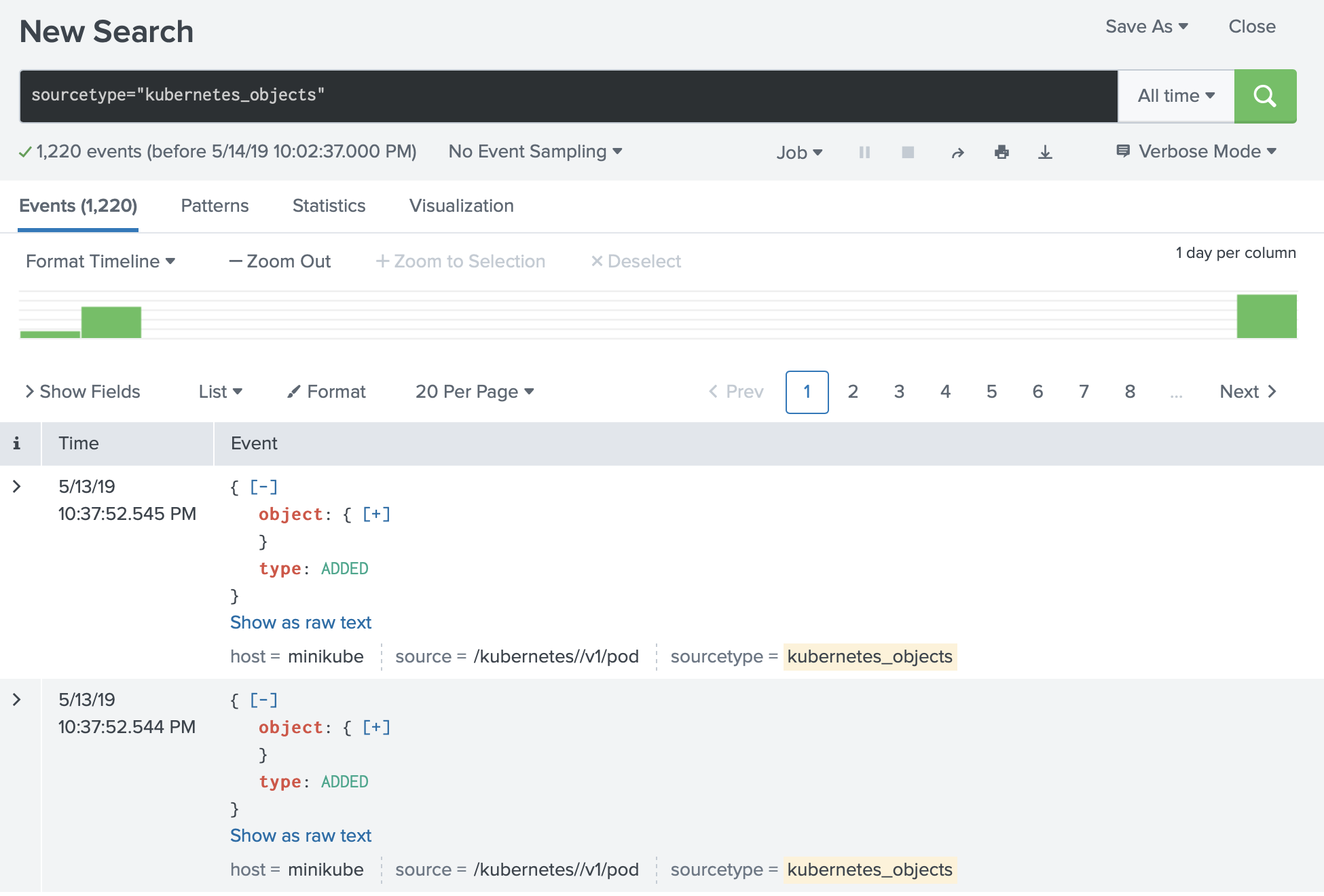
Searching the data
Because the same object can show up multiple times in the same window - once per modification, plus the periodic full refresh - group by the object’s unique identifier and take the latest version per group:
1sourcetype="kubernetes_objects" source="/kubernetes//v1/pod" |
2spath output=uid path=object.metadata.uid |
3stats latest(_raw) as _raw, latest(_time) as _time by uid, kubernetes_namespace |
4spath output=name path=object.metadata.name |
5spath output=creationTimestamp path=object.metadata.creationTimestamp |
6table kubernetes_namespace, name, creationTimestamp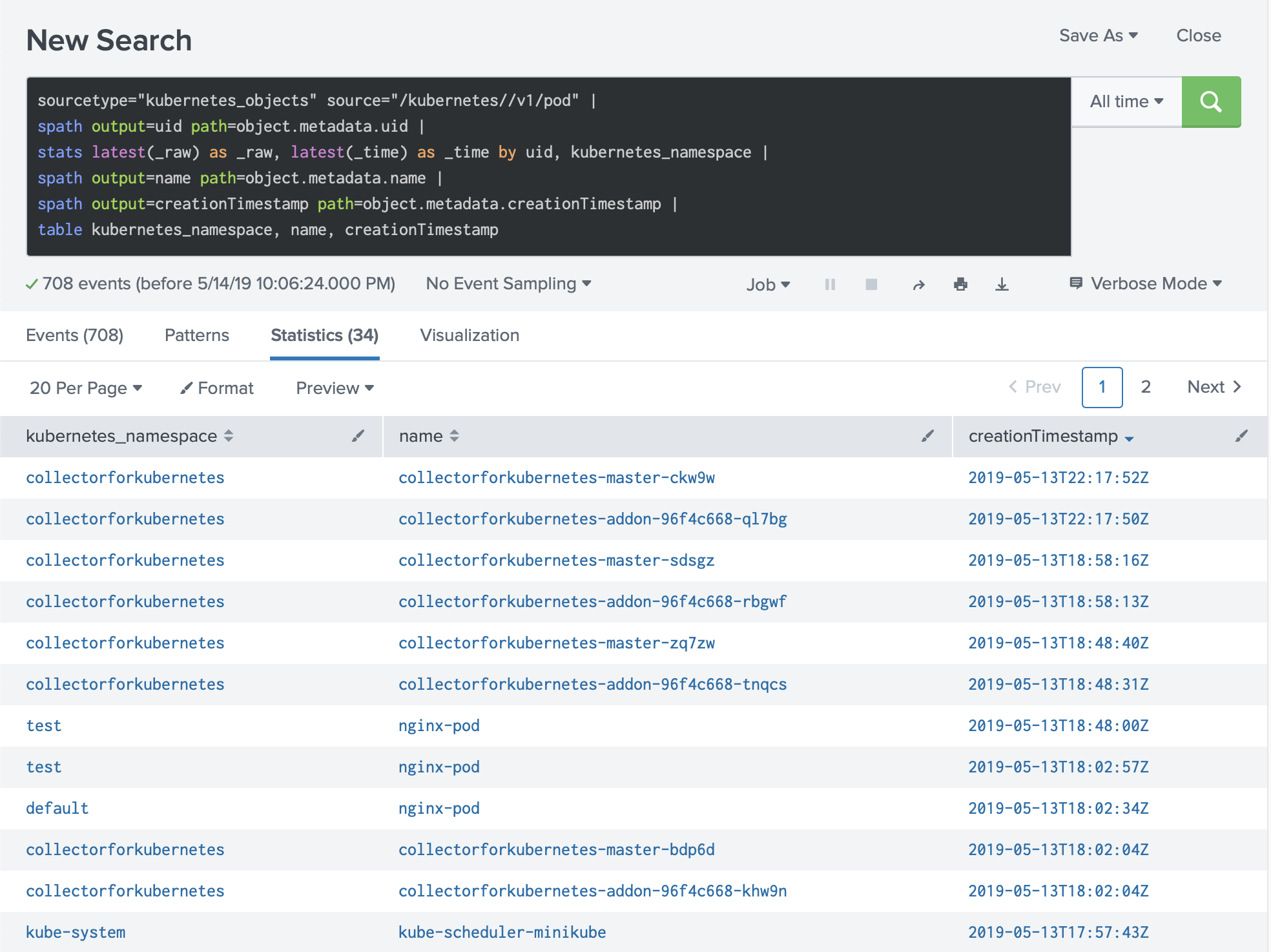
Example. Extracting limits
A more involved search - extracting CPU, memory, and GPU requests and limits per container:
 1sourcetype="kubernetes_objects" source="/kubernetes//v1/pod" |
 2spath output=uid path=object.metadata.uid |
 3stats latest(_raw) as _raw, latest(_time) as _time by uid, kubernetes_namespace |
 4spath output=pod_name path=object.metadata.name |
 5spath output=containers path=object.spec.containers{} |
 6mvexpand containers |
 7spath output=container_name path=name input=containers  |
 8spath output=limits_cpu path=resources.limits.cpu input=containers |
 9spath output=requests_cpu path=resources.requests.cpu input=containers |
10spath output=limits_memory path=resources.limits.memory input=containers |
11spath output=requests_memory path=resources.requests.memory input=containers |
12spath output=limits_gpu path=resources.limits.nvidia.com/gpu input=containers |
13spath output=requests_gpu path=resources.requests.nvidia.com/gpu input=containers |
14table kubernetes_namespace, pod_name, container_name, limits_cpu, requests_cpu, limits_memory, requests_memory, limits_gpu, requests_gpu