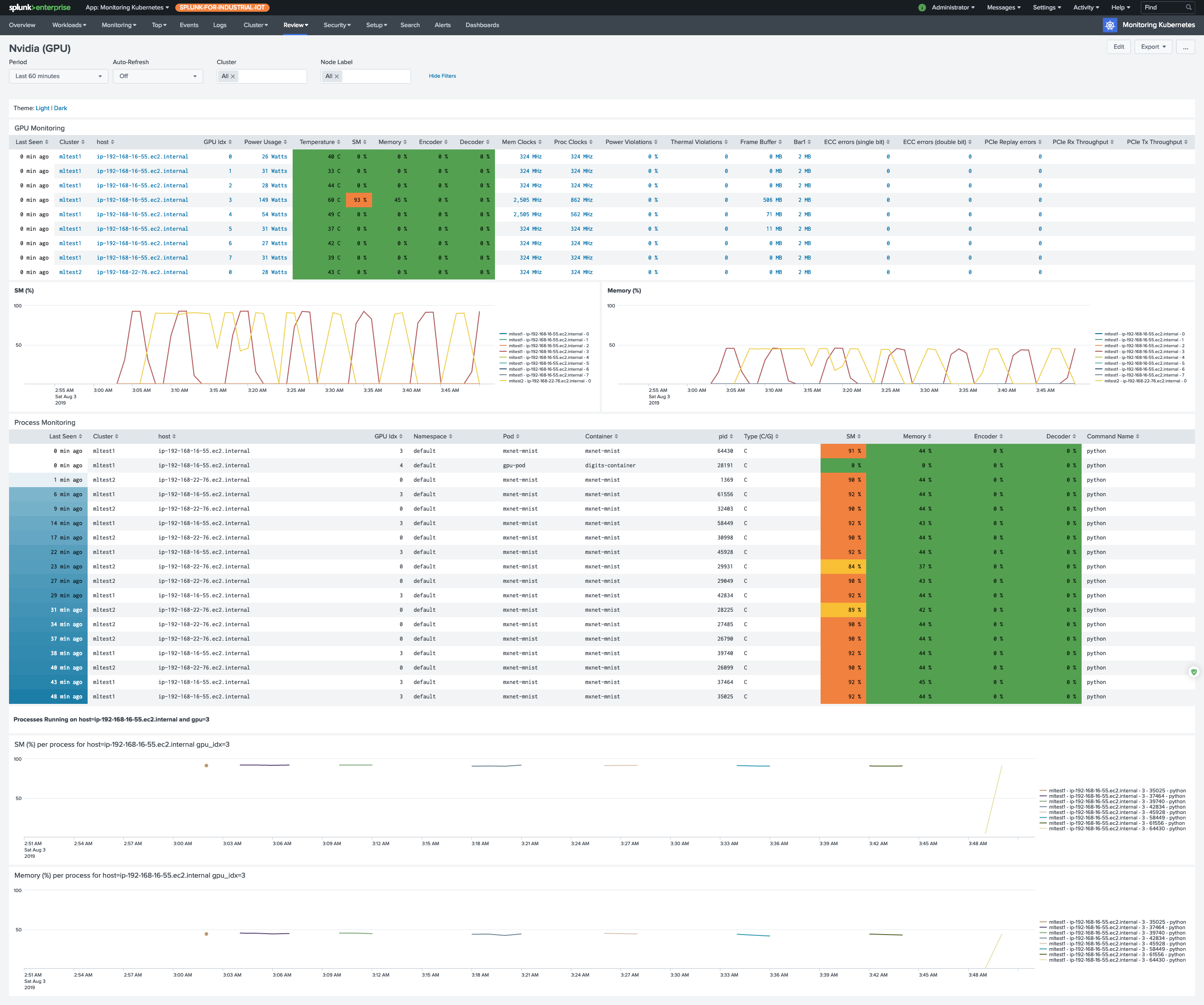
GPU utilization, memory pressure, and per-process consumption rarely show up in the standard Kubernetes metrics surface, which makes troubleshooting an underperforming training job or an idle inference pod painful. To see them in the Monitoring Kubernetes app’s GPU dashboard, deploy the small DaemonSet on this page.
The DaemonSet runs nvidia-smi on each GPU node and formats the output as CSV, which Collectord forwards into Splunk.
Install the collection
Before you begin
If only some nodes in your cluster have GPUs attached, label those nodes so the DaemonSet only schedules where it can actually run:
1kubectl label nodes <gpu-node-name> hardware-type=NVIDIAGPUThe DaemonSet below targets that label through nodeSelector.
Deploy the Nvidia-SMI DaemonSet
The DaemonSet runs two containers per GPU node, calling each tool every 30 seconds:
- one for
nvidia-smi pmon, per process; - one for
nvidia-smi dmon, at the device level.
Both tools emit human-readable, space-padded text by default. The Collectord annotations on the pod template turn it into clean CSV that’s trivial to extract fields from in Splunk: they strip the headers, collapse whitespace into commas, and drop empty - placeholders.
The pmon-- and dmon-- annotation prefixes scope overrides to one container. They set a separate sourcetype for each, plus a regex that drops the “nothing to report” line pmon emits when no processes are using a GPU.
For background on nvidia-smi, see NVIDIA System Management Interface.
Save the manifest below as nvidia-smi.yaml:
 1apiVersion: apps/v1
 2kind: DaemonSet
 3metadata:
 4  name: collectorforkubernetes-nvidia-smi
 5  namespace: collectorforkubernetes
 6  labels:
 7    app: collectorforkubernetes-nvidia-smi
 8spec:
 9  updateStrategy:
10    type: RollingUpdate
11
12  selector:
13    matchLabels:
14      daemon: collectorforkubernetes-nvidia-smi
15
16  template:
17    metadata:
18      name: collectorforkubernetes-nvidia-smi
19      labels:
20        daemon: collectorforkubernetes-nvidia-smi
21      annotations:
22        collectord.io/logs-joinpartial: 'false'
23        collectord.io/logs-joinmultiline: 'false'
24        # remove headers
25        collectord.io/logs-replace.1-search: '^#.*$'
26        collectord.io/logs-replace.1-val: ''
27        # trim spaces from both sides
28        collectord.io/logs-replace.2-search: '(^\s+)|(\s+$)'
29        collectord.io/logs-replace.2-val: ''
30        # make a CSV from console presented line
31        collectord.io/logs-replace.3-search: '\s+'
32        collectord.io/logs-replace.3-val: ','
33        # empty values '-' replace with empty values
34        collectord.io/logs-replace.4-search: '-'
35        collectord.io/logs-replace.4-val: ''
36        # nothing to report from pmon - just ignore the line
37        collectord.io/pmon--logs-replace.0-search: '^\s+\d+(\s+-)+\s*$'
38        collectord.io/pmon--logs-replace.0-val: ''
39        # set log source types
40        collectord.io/pmon--logs-type: kubernetes_gpu_nvidia_pmon
41        collectord.io/dmon--logs-type: kubernetes_gpu_nvidia_dmon
42    spec:
43      # Make sure to attach matching label to the GPU node
44      # $ kubectl label nodes <gpu-node-name> hardware-type=NVIDIAGPU
45      nodeSelector:
46        hardware-type: NVIDIAGPU
47      hostPID: true
48      containers:
49      - name: pmon
50        image: nvidia/cuda:13.2.0-base-ubuntu22.04
51        args:
52          - "bash"
53          - "-c"
54          - "while true; do nvidia-smi --list-gpus | cut -d':' -f 3 | cut -c2-41 | xargs -L4 echo | sed 's/ /,/g' | xargs -I {} bash -c 'nvidia-smi pmon -s um --count 1 --id {}'; sleep 30 ;done"
55      - name: dmon
56        image: nvidia/cuda:13.2.0-base-ubuntu22.04
57        args:
58          - "bash"
59          - "-c"
60          - "while true; do nvidia-smi --list-gpus | cut -d':' -f 3 | cut -c2-41 | xargs -L4 echo | sed 's/ /,/g' | xargs -I {} bash -c 'nvidia-smi dmon -s pucvmet --count 1 --id {}'; sleep 30 ;done"
Apply it:
1kubectl apply -f nvidia-smi.yamlThe GPU dashboard starts populating within a minute or two.