If a container exposes metrics in Prometheus format, point Collectord at it to forward those metrics to Splunk alongside your container logs. Collectord for Docker doesn’t scrape any Prometheus endpoints by default.
Configuration
Define each scrape target as its own [input.prometheus::NAME] stanza. The name is yours to pick: make it descriptive, since it shows up alongside the metrics. The rest of the stanza sets where to scrape, how often, and how to authenticate.
 1[input.prometheus::ANYNAME]
 2
 3# disable input
 4disabled = false
 5
 6# specify the type for current input
 7type = docker_prometheus
 8
 9# specify Splunk index for current input
10index =
11
12# specify the host for current input
13host =
14
15# specify the source
16source =
17
18# how often to collect prometheus metrics
19interval = 60s
20
21# Prometheus endpoint, multiple values can be specified, collectord tries them in order till finding the first
22# working endpoint.
23# At first trying to get it through proxy
24endpoint.1 =
25# endpoint.2 =
26
27# token for "Authorization: Bearer $(cat tokenPath)"
28tokenPath =
29
30# server certificate for certificate validation
31certPath =
32
33# client certificate and key for authentication
34clientCertPath =
35clientKeyPath =
36
37# Allow invalid SSL server certificate
38insecure = false
39
40# include metrics help with the events
41includeHelp = false
The Prometheus project maintains a long list of exporters for popular services: databases, web servers, message brokers, and more. Drop one into your environment and point Collectord at it.
Example. Collecting metrics from nginx service.
This example scrapes an nginx container that already exposes a /metrics endpoint. It uses the sophos/nginx-prometheus-metrics image, which is self-contained and ships ready to scrape.
Start the container with the metrics port published. This image exposes its Prometheus endpoint on 9527:
1docker run -d --rm -it -p 80:80 -p 1314:1314 -p 9527:9527 sophos/nginx-prometheus-metricsDefine the Collectord input in 002.conf. The key choice is how Collectord reaches the metrics endpoint. This example uses the published port and host.docker.internal: the configuration stays simple, at the cost of relying on the host’s external network path.
 1[general]
 2acceptLicense = true
 3
 4[output.splunk]
 5url = https://hec.example.com:8088/services/collector/event/1.0
 6token = B5A79AAD-D822-46CC-80D1-819F80D7BFB0
 7insecure = true
 8
 9[input.prometheus::nginx-example]
10disabled = false
11type = docker_prometheus
12index =
13host =
14source = docker_nginx_example
15interval = 60s
16endpoint.1 = http://host.docker.internal:9527/metrics
17tokenPath =
18certPath =
19clientCertPath =
20clientKeyPath =
21insecure = false
22includeHelp = true
Bake the configuration into your Collectord image:
1FROM registry.outcold.solutions/outcoldsolutions/collectorfordocker:26.10.1
2
3COPY 002.conf /config/002.conf
Then deploy it as Installation describes.
sophos/nginx-prometheus-metricsis a community image, not an official nginx image. This example uses it only for demonstration.
Metrics format
Prometheus defines several metric types. Collectord keeps each metric’s type, so you can search and aggregate accordingly.
Every metric event in Splunk carries:
metric_type- one of the Prometheus metric types.metric_name- the name of the metric.metric_help- the metric’s definition, included only whenincludeHelpistrue.metric_label_XXX- one field per Prometheus label on the metric.seed- a unique value per host and metric collection.
The numeric fields depend on the type:
counterv- current counter valued- the difference with a previous values- period for which this difference is calculated (in seconds)p- (deprecated) period for which this difference is calculated (in nanoseconds)
summaryandhistogramv- valuec- counter specified for thissummaryorhistogrammetric
All others
v- value
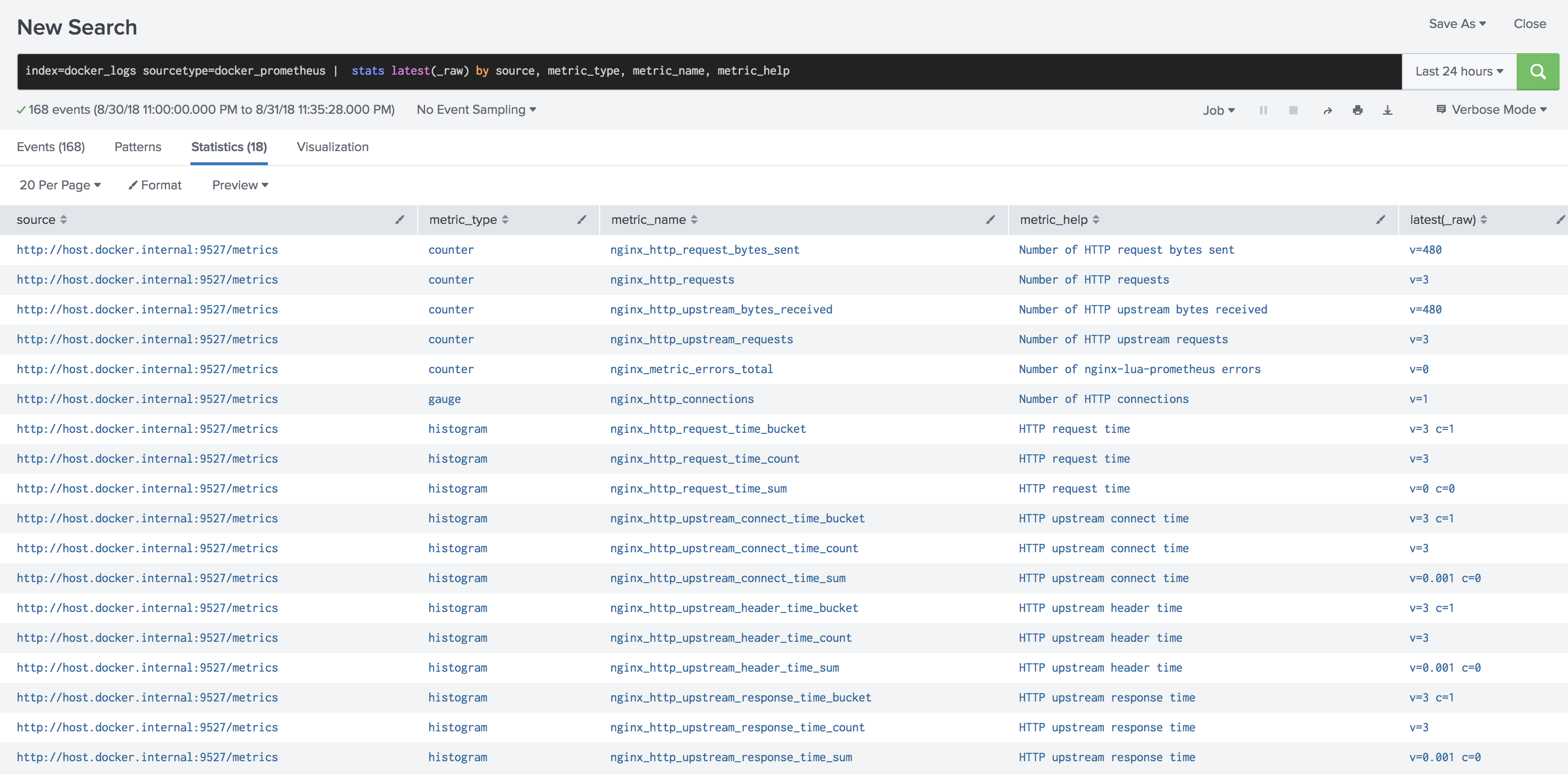
With includeHelp on, this search lists every metric Collectord forwards, with its description. Run it to see what’s available before you build a dashboard:
1sourcetype="docker_prometheus"
2|  stats latest(_raw) by source, metric_type, metric_name, metric_help