Before you can query an account you register it once on the Setup page. A registration is an account id, a default region, and a credential. This page covers the account form, the three credential types and the IAM policy each one needs, the region lock, and per-user credentials.
Add an account
Open the app’s Setup page and, on the Accounts tab, press Add account:
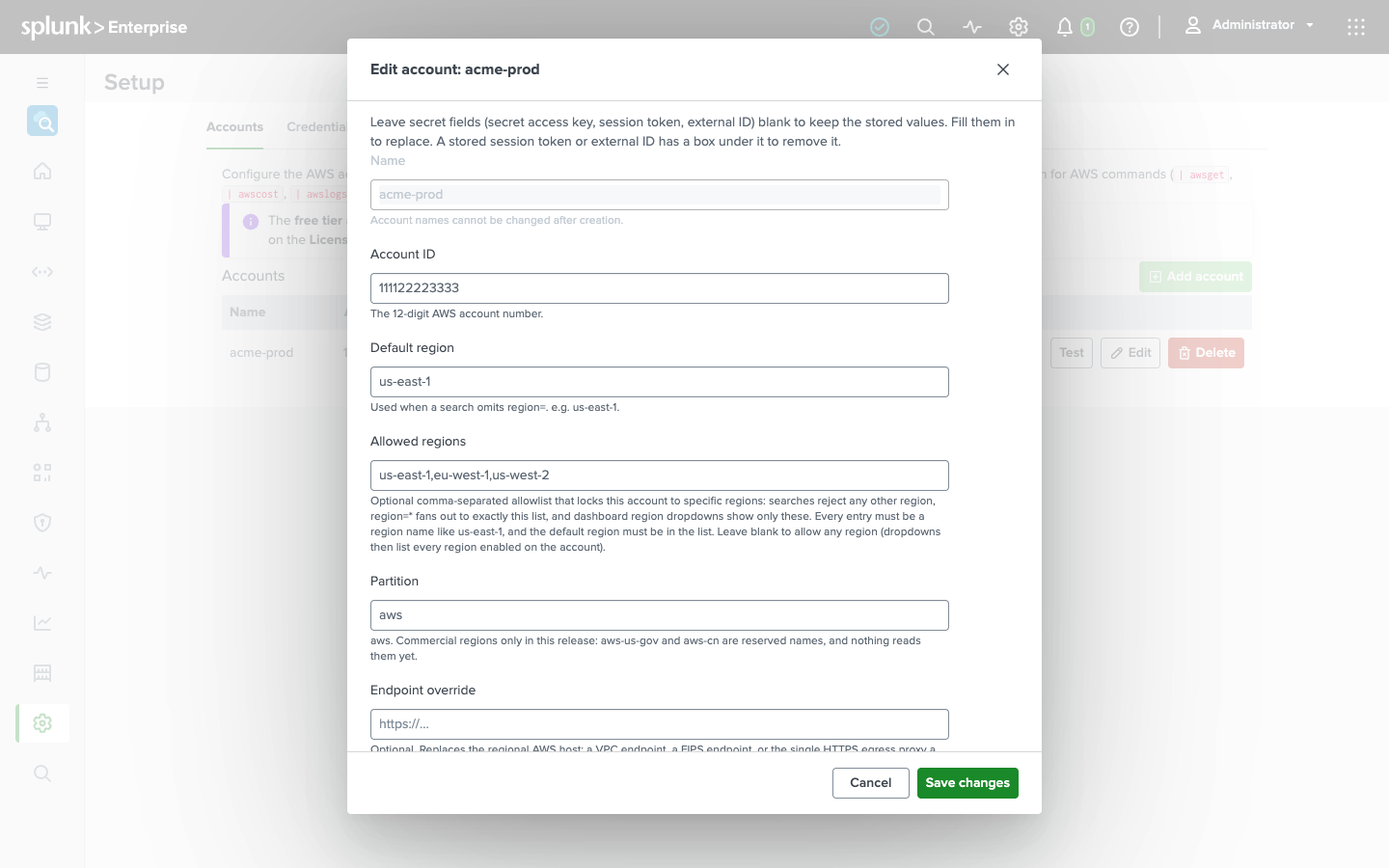
| Field | What it is |
|---|---|
| Name | The handle you use in account=, e.g. prod or payments-prod. Cannot be changed later, and must not contain __. |
| Account ID | The 12-digit AWS account number. Informational - the credential decides which account you actually reach. |
| Default region | Used when a search omits region=, and the region the dashboards open on. |
| Allowed regions | Optional comma-separated allowlist that locks the account to these regions. See below. |
| Partition | aws. Commercial regions only in this release; any other value is refused when you save. |
| Endpoint override | Optional base URL that replaces the regional AWS host. See below. |
| Auth type | Static keys, assume role, or instance role. See below. |
Names must be unique. On the free tier you can register one account; more requires a paid license (see Licensing).
After saving, press Test on the account’s row. The app resolves the stored credential and calls sts:GetCallerIdentity, then shows the ARN it authenticated as. Do this after every credential change: it separates a bad key from a missing permission before your first search does.
IAM policy
The identity the app uses needs two things, and the second does nothing without the first.
1. Read access to the services you query. | awsget reads resources through the Cloud Control API, and Cloud Control calls each service’s own describe and list APIs with your permissions - so cloudformation:ListResources on its own lists nothing. Attach the AWS-managed ReadOnlyAccess policy, or the read actions of the services you query (ec2:Describe*, lambda:List* and lambda:Get*, s3:GetBucket*, and so on).
2. This policy, which grants exactly the calls the search commands themselves make - no write, no delete, except in its last two statements. Those exist only for | awsathena: Athena writes every query’s results to its result bucket with the caller’s permissions, so that one bucket has to be writable.
 1{
 2  "Version": "2012-10-17",
 3  "Statement": [
 4    {
 5      "Sid": "AWSSearchReadOnly",
 6      "Effect": "Allow",
 7      "Action": [
 8        "cloudformation:GetResource",
 9        "cloudformation:ListResources",
10        "cloudtrail:LookupEvents",
11        "ce:GetCostAndUsage",
12        "tag:GetResources",
13        "iam:GenerateCredentialReport",
14        "iam:GetCredentialReport",
15        "logs:StartQuery",
16        "logs:GetQueryResults",
17        "logs:StopQuery",
18        "logs:FilterLogEvents",
19        "logs:DescribeLogGroups",
20        "cloudwatch:GetMetricData",
21        "cloudwatch:ListMetrics",
22        "cloudwatch:DescribeAlarms",
23        "cloudwatch:DescribeAlarmHistory",
24        "athena:StartQueryExecution",
25        "athena:GetQueryExecution",
26        "athena:GetQueryResults",
27        "athena:StopQueryExecution",
28        "glue:GetDatabase",
29        "glue:GetDatabases",
30        "glue:GetTable",
31        "glue:GetTables",
32        "glue:GetPartition",
33        "glue:GetPartitions",
34        "glue:BatchGetPartition",
35        "ec2:DescribeRegions",
36        "s3:GetBucketLocation",
37        "s3:ListBucket",
38        "s3:GetObject"
39      ],
40      "Resource": "*"
41    },
42    {
43      "Sid": "AthenaResultsBucket",
44      "Effect": "Allow",
45      "Action": [
46        "s3:ListBucketMultipartUploads"
47      ],
48      "Resource": "arn:aws:s3:::my-athena-results"
49    },
50    {
51      "Sid": "AthenaResultsObjects",
52      "Effect": "Allow",
53      "Action": [
54        "s3:PutObject",
55        "s3:AbortMultipartUpload",
56        "s3:ListMultipartUploadParts"
57      ],
58      "Resource": "arn:aws:s3:::my-athena-results/*"
59    }
60  ]
61}
Five notes on it:
cloudformation:ListResourcesandcloudformation:GetResourceare the Cloud Control API’s actions - Cloud Control shares CloudFormation’s IAM prefix, and there is nocloudcontrol:one.- Beside
ReadOnlyAccessyou can cut this policy down to the four actions that run a query -athena:StartQueryExecution,athena:StopQueryExecution,logs:StartQuery, andlogs:StopQuery- and the last two statements. - In the last two statements, replace
my-athena-resultswith your Athena result bucket - the one named in the workgroup or inoutput_location=. - The first statement’s
s3:GetBucketLocation,s3:ListBucket, ands3:GetObjectare on*on purpose: with them Athena reads the data your tables point at, as well as reading its results back. To scope them down, list every bucket your tables live in and the result bucket - the result bucket alone leaves Athena unable to read the tables. - If the result bucket, the workgroup, or the tables’ data use a customer-managed KMS key, the identity also needs
kms:GenerateDataKeyandkms:Decrypton that key.ReadOnlyAccessgrants neither.
If you do not use | awsathena, leave out the last two statements, the athena:* actions, and the s3:* entries; | awsglue needs only the glue:Get* actions.
ec2:DescribeRegions is what lets the dashboards’ region pickers list the regions enabled on an account when no allowed-regions list is configured. iam:GenerateCredentialReport and iam:GetCredentialReport read the IAM credential report behind the IAM dashboard’s Credentials tab, cloudwatch:DescribeAlarms the alarm states on the CloudWatch dashboard and the Overview, and cloudwatch:DescribeAlarmHistory the CloudWatch dashboard’s History tab and the Overview’s alarms-that-fired tile; ReadOnlyAccess grants them all.
Credential types
Static keys
An IAM user’s access key id and secret access key. The simplest option, available on the free tier. Store both on the account form; the secret is kept in Splunk’s encrypted credential store (storage/passwords) and never displayed again. A session token field covers temporary STS credentials, which expire - prefer long-lived keys for an always-on search head, and rotate them on the account form (leave a secret field blank to keep the stored value, type into it to replace). A new access key id has to come with its secret: AWS issues the two together, so the form refuses a key id changed on its own rather than saving it beside the previous key’s secret. Changing an account’s or a per-user credential’s type removes the credential stored for the previous type, secrets included, so the new one has to be filled in completely before it can be saved. Whatever was once stored can also be taken away again: empty the role session name to go back to the generated one, empty the base access key ID to assume the role from the instance role, and tick the box under a stored session token or external ID to remove it. A session token belongs to the temporary key it was issued with, so saving a different access key ID without a new token removes the old one.
Assume role
The app assumes an IAM role in the target account and works with its temporary credentials. This is the way to reach many accounts from one identity, and the credential type that gives you attribution: the app stamps the Splunk username into the role session name (os_aws_search@<user>), so the target account’s CloudTrail records which person ran the search. That holds as long as you leave the account’s role session name empty: a name you set there is used for every user’s session, and the per-person attribution is gone. Cross-account assume-role is a paid feature.
Fill in the role ARN, the external id the role’s trust policy requires, and optionally a session duration: 900 to 43200 seconds, the range AWS STS accepts, and no longer than the role’s own maximum session duration. Left empty, STS issues one-hour credentials. The base credentials are what call sts:AssumeRole: a static key pair, or, left blank, the search head’s instance role - the EC2 instance profile, so fill them in on Splunk Cloud and on a search head that runs on ECS or EKS.
A trust policy for the role in the target account, allowing an identity in the search head’s account to assume it with an external id:
 1{
 2  "Version": "2012-10-17",
 3  "Statement": [
 4    {
 5      "Effect": "Allow",
 6      "Principal": { "AWS": "arn:aws:iam::111111111111:user/splunk-aws-search" },
 7      "Action": "sts:AssumeRole",
 8      "Condition": { "StringEquals": { "sts:ExternalId": "payments-prod-7f3a" } }
 9    }
10  ]
11}
Attach the permissions above - ReadOnlyAccess and the policy - to the role, and give the base identity sts:AssumeRole on the role’s ARN and nothing else.
Instance role
The IAM role of the EC2 instance profile attached to the host the search head runs on, read from the instance metadata service. No key is stored anywhere; AWS supplies temporary credentials at request time. Available on the free tier. The app does not read an ECS task role or an EKS service-account role, so use static keys, or an assumed role with base keys, for a search head that runs there. Self-managed search heads only: a Splunk Cloud search head has no instance role you control, so use static keys, or an assumed role with base keys, there too.
Allowed regions
Leave the list blank and any valid region is accepted: the dashboards’ region pickers enumerate every region enabled on the account via ec2:DescribeRegions, and region=* uses the account’s default region with a warning saying so.
Set a list - us-east-1, eu-west-1 - and the account is locked to it: a search naming any other region is rejected for that account, region=* fans out to exactly the list, and the pickers show only those regions, plus an “All allowed regions” entry. A page about one resource, such as an instance or a queue, has no such entry: it opens in the region of the row you clicked. The Lambda function and S3 bucket pages keep it, the Lambda page showing the function in one region and naming any other region that has a function of the same name. The default region must be in the list. This is the right setting for an account that only operates in known regions - it keeps a region=* fan-out from touching regions you never use.
Keep us-east-1 in the list, even for an account that runs elsewhere. AWS records global events in CloudTrail there (IAM, console sign-ins, root user activity), and keeps CloudFront’s certificates, metrics, and web ACLs and Route 53 health-check metrics there. Without it, the Edge & certificates dashboard’s CloudFront and health-check panels and the WAF dashboard’s CloudFront scope show a warning and no data, and the Overview’s certificate, sign-in, and root user tiles count only the allowed regions.
Endpoint override
Optional base URL - scheme and host - that replaces the default regional AWS host for every service call the account makes. Use it for a VPC endpoint, a FIPS endpoint, or the single HTTPS egress proxy your search heads route AWS traffic through, which is the usual shape on Splunk Cloud. Leave it blank for the standard AWS endpoints. The same base URL is used for every service, STS included - an assumed role’s sts:AssumeRole request and the Test button go there too - so it suits a gateway or proxy that fronts all of them. A forward proxy configured in Splunk itself needs no override; see Configuration.
The override has to be an HTTPS endpoint. A bare host is served over HTTPS; an explicit http:// is refused, because it would send signed requests - the Authorization header and the session token - in clear text. An instance-metadata address is refused at any scheme, the link-local range and AWS’s IPv6 metadata address alike: that is where the search head’s own credentials are served, not an AWS service. Nor may the override carry credentials, a query or a fragment - no @, ? or # - because awsaccounts.conf is readable by every Splunk user, so a password or token written into it would be readable by all of them; a path prefix, which a reverse proxy may want, is fine. All three rules apply when an account is saved and again when awsaccounts.conf is loaded, so a value edited into the file by hand is refused too - the account is skipped and the search’s messages say which one and why. If you deliberately point an account at a plaintext endpoint, a local mock being the one case we know of, add allow_insecure_endpoint = true to that account’s stanza in awsaccounts.conf; it is not offered on the Setup page on purpose, and it permits the plaintext scheme only, never the metadata address or a credential in the URL. The app’s TLS client applies current Go defaults: a proxy or VPC endpoint presenting a certificate with a SHA-1 signature or an RSA key under 2048 bits is refused.
Per-user credentials
Each account’s credential above is its shared credential: every user’s searches use it. On the Credentials tab a user can register their own credential for an account - their own static keys or their own role to assume - and their searches then use that instead. The override itself - which key id or role - is stored in the user’s own awsauth.conf. Its secrets go into the app’s credential store under a name bound to that user’s identity, and the app resolves such a secret for that user only, never for another. A per-user override replaces the account’s credential outright and inherits nothing from it, so a per-user role carries its own base credentials: the user’s static keys that make the sts:AssumeRole call, entered on the same form, with an optional session duration. They are required on every platform: a per-user role with no base keys would be assumed from the search head’s own identity, so the form refuses to save one without them (see below). Per-user credentials are a paid feature; the trade-offs are in Access control.
An override has to be a credential of the user’s own: instance_role, and an assumed role with no base key pair, are refused on save, because both would sign requests with the search head’s own identity. See Access control.
Where configuration is stored
The account registry - ids, regions, endpoints, and references to credentials - lives in the app’s awsaccounts.conf; per-user overrides live in each user’s awsauth.conf. Secrets never go into either: secret access keys, session tokens, and external ids are kept in Splunk’s encrypted storage/passwords and referenced by name, while an account’s access key id is stored in awsaccounts.conf itself. If you edit awsaccounts.conf by hand, keep each *_ref naming the account’s own secret, aws_search:account__<name>__<suffix>:, the name the Setup page writes: an account whose *_ref names any other secret is refused when it is saved and when you press Test, and searches skip it with a warning that says to re-enter the credential on the Setup page. In a search head cluster, the registry, the overrides, and the credentials all replicate across members automatically.