This guide takes you from zero to a working agent: install the app on a search head, assign the roles, add and test a provider, and ask your first question. A typical setup takes under 10 minutes, and the free tier needs no license key. If you want more than one provider or user, or use it commercially, contact sales@outcoldsolutions.com to request an evaluation license.
Requirements
In brief: Splunk Enterprise 9.4, 10.0, 10.2, 10.4, or 10.6 on a search head with KV Store (or Splunk Cloud), outbound HTTPS from that search head to your LLM provider, and a credential for it. The full compatibility matrix is in Requirements.
Install the app
Install the latest OS AI Agent app from Splunkbase on your search heads only:
- Splunk Enterprise: Apps - Find More Apps in Splunk Web, or download the package from Splunkbase and install it with Apps - Manage Apps - Install app from file (or unpack it into
$SPLUNK_HOME/etc/apps/). - Splunk Cloud: install it from Splunkbase the way you install any Splunkbase app on your stack. See Splunk Cloud.
- Search head cluster: push it through the deployer, the same way you deploy any app.
No restart of your indexing tier is needed.
The app installs three custom roles, one search command (| osai), one alert action, and two inputs: a background worker that runs chat jobs, and a health check that posts problems to Splunk’s bulletin messages.
Assign roles
OS AI Agent separates the people who configure it from the people who use it. Three roles ship with the app:
os_ai_agent_user- use Chat and run| osai. Grant this to anyone who should talk to the agent.os_ai_agent_admin- everything a user can do, plus manage providers, chat defaults, spend limits, the log level, guidance, and query templates on the Setup page. The license key, the activity trail switch, retention, and the add-on search commands the agent may run without asking need a full Splunk administrator. Grant this to whoever owns the deployment.os_ai_agent_alerts- may be named as the “Run as” user of an app-shared alert’s investigation, or as therun_as=user of a| osai task=search owned by nobody. Ships with no members; add users to it only when you set up alert investigations (see Alerts and schedules).
A full Splunk administrator (the built-in admin_all_objects capability) can use and configure the app without the first two roles. Assign roles under Settings - Roles. The capabilities behind them are covered in Security.
Add a provider
Open the app. Until a provider exists, Splunk sends you to the Setup page. Each of its tabs opens by link - /app/os_ai_agent/setup#providers, and likewise #settings, #guidance, #templates and #license - and the app’s messages that send you there name the tab that way. On the Providers tab, press Add provider, choose the kind, and fill in the endpoint and credential:
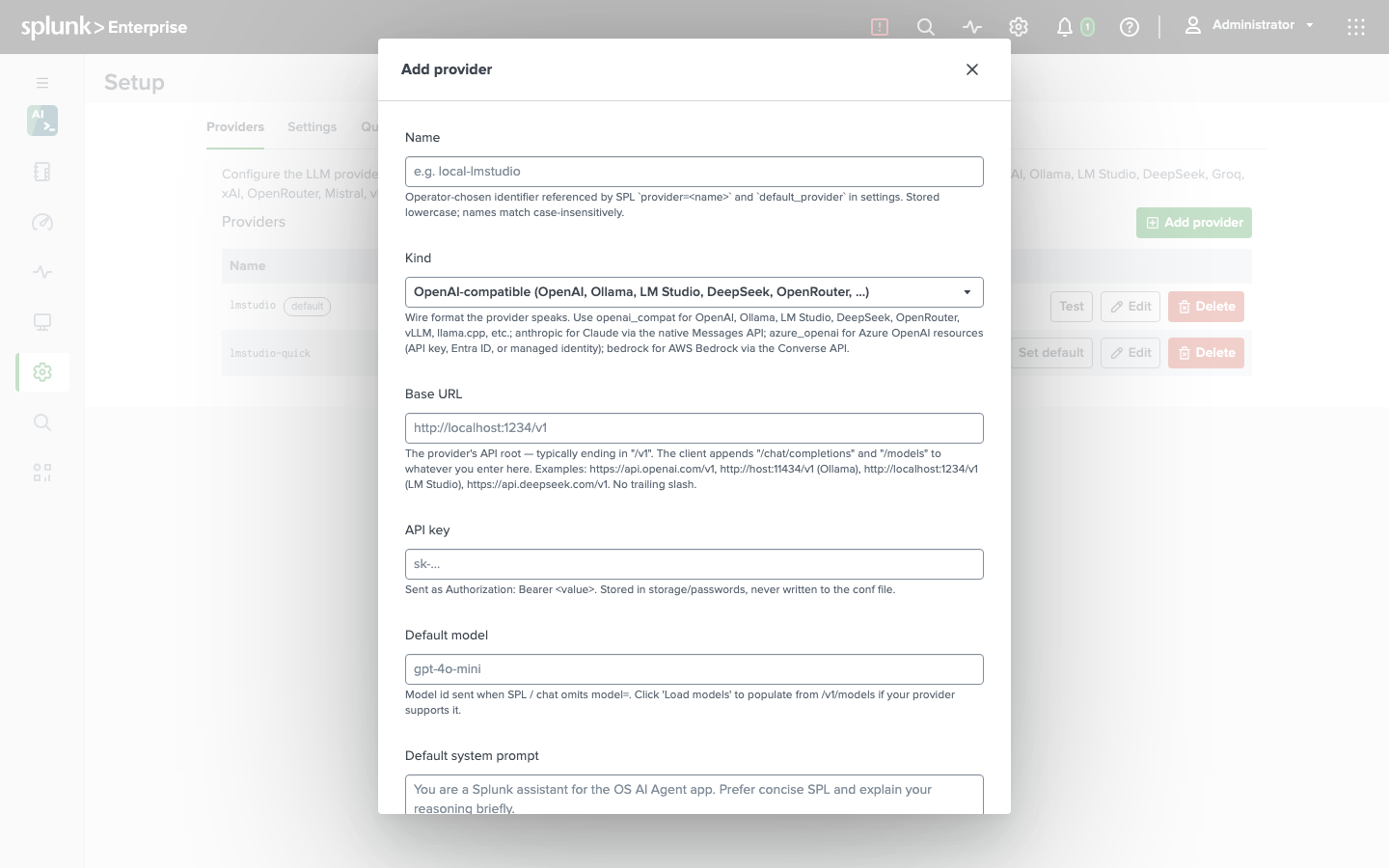
For OpenAI that is the base URL https://api.openai.com/v1, an API key, and a default model such as gpt-4o-mini. For a local model behind LM Studio or Ollama it is the server’s /v1 URL and no key. The API key goes into Splunk’s encrypted credential store and is never displayed again. Every kind, with its URL shape and authentication options, is in Providers.
Save, then press Load models on the edit form to pick the default model from what the provider offers, and Test on the provider’s row: the app runs a real completion through the whole chain - credential, endpoint, model - and reports the latency. The first provider you create becomes the default.
On the free tier you can configure one provider. Adding a second requires a paid license.
Saving the first provider clears Splunk’s setup gate. Splunk checks that gate at sign-in, so reload Splunk Web (or sign out and back in) before opening Chat.
Have your first conversation
Open Chat and ask something the agent can answer from your deployment:
What indexes do I have, and which one grew the most in the last 24 hours?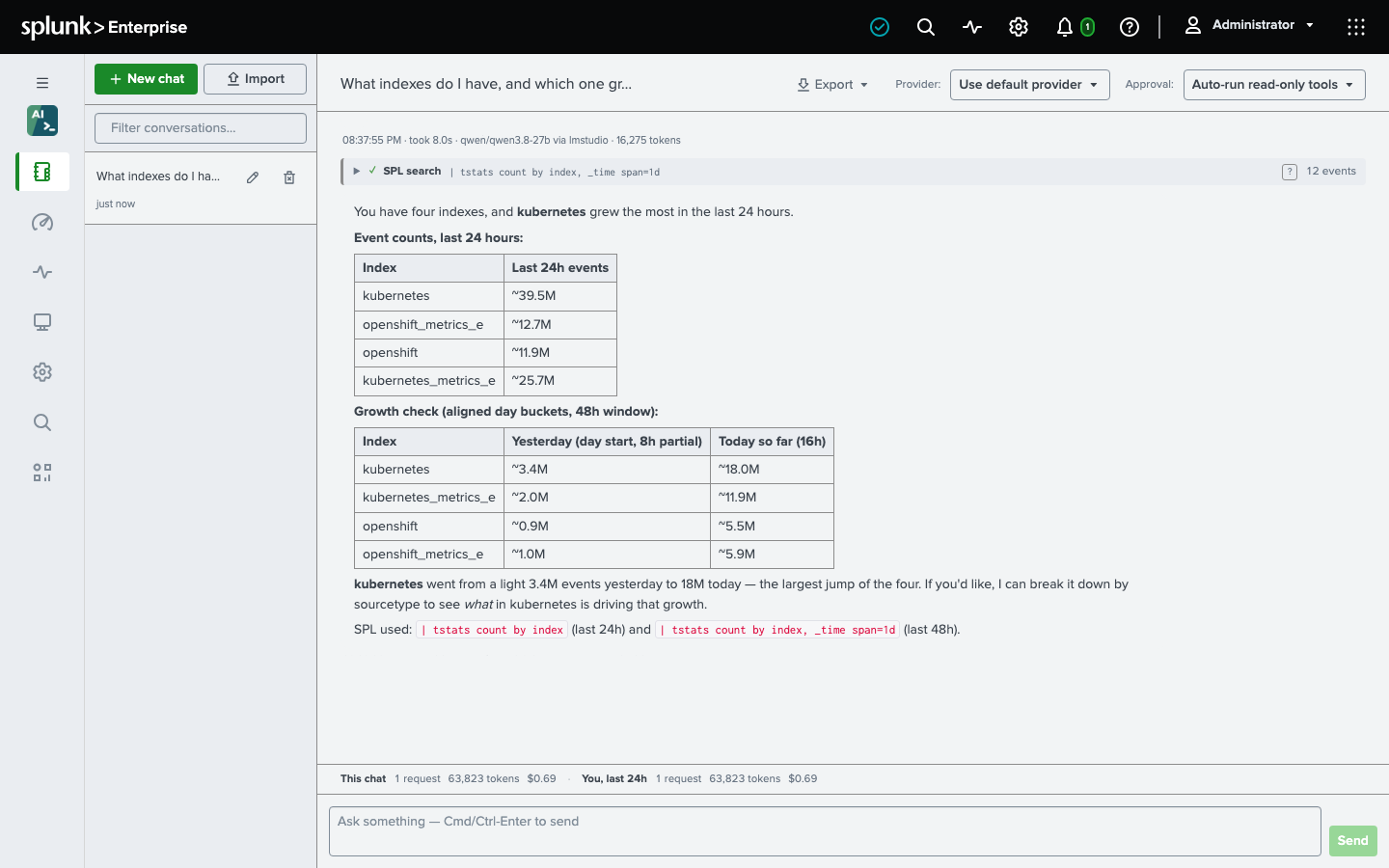
The agent lists your indexes, runs a bounded search, and answers with the numbers - each tool it ran appears as a one-line card you can expand to see the exact SPL and result. Read-only tools run without asking. Ask it to build something and it pauses instead:
Build a dashboard with error counts by sourcetype for index=payments over the last 7 days.An approval card shows exactly what will be written; Approve it, Deny it with a reason the agent adapts to, or edit the parameters first. See Chat.
Call it from SPL
The same agent is a search command:
| osai prompt="Summarize what a 503 from an API gateway usually means, in two sentences"| osai explain="index=payments sourcetype=api | stats count by status | sort -count"The full syntax is in The osai command.
Free tier and licensing
OS AI Agent runs with no license key on the free tier: one provider and one user - the seat is claimed by the first person a run is submitted for, whether from Chat, | osai, or an alert investigation - for non-commercial use. A paid license, priced per user, lifts the provider cap, enables everyone holding the app’s capability, and covers commercial use. See Licensing.
Search head clustering
In a search head cluster, deploy the app through the deployer. Providers, settings, and the license replicate to every member; conversations and jobs live in KV Store; and each chat job is claimed by exactly one member, so a conversation started on one member continues on whichever member runs it. The key that encrypts queued jobs’ credentials is created on the member that takes the first job and replicates through storage/passwords; a member it has not reached yet leaves the job for one it has, so the very first reply can take a few seconds longer.