Providers, the license, and the query templates each have their own tab on the Setup page. The situational guidance notes are on the Guidance tab, and everything else an operator tunes is on the Settings tab: the chat defaults, the add-on search commands the agent may run without asking, the spend limits, how long the app keeps what it stores, the activity trail, and the log level. All of it lives in os_ai_agent.conf.
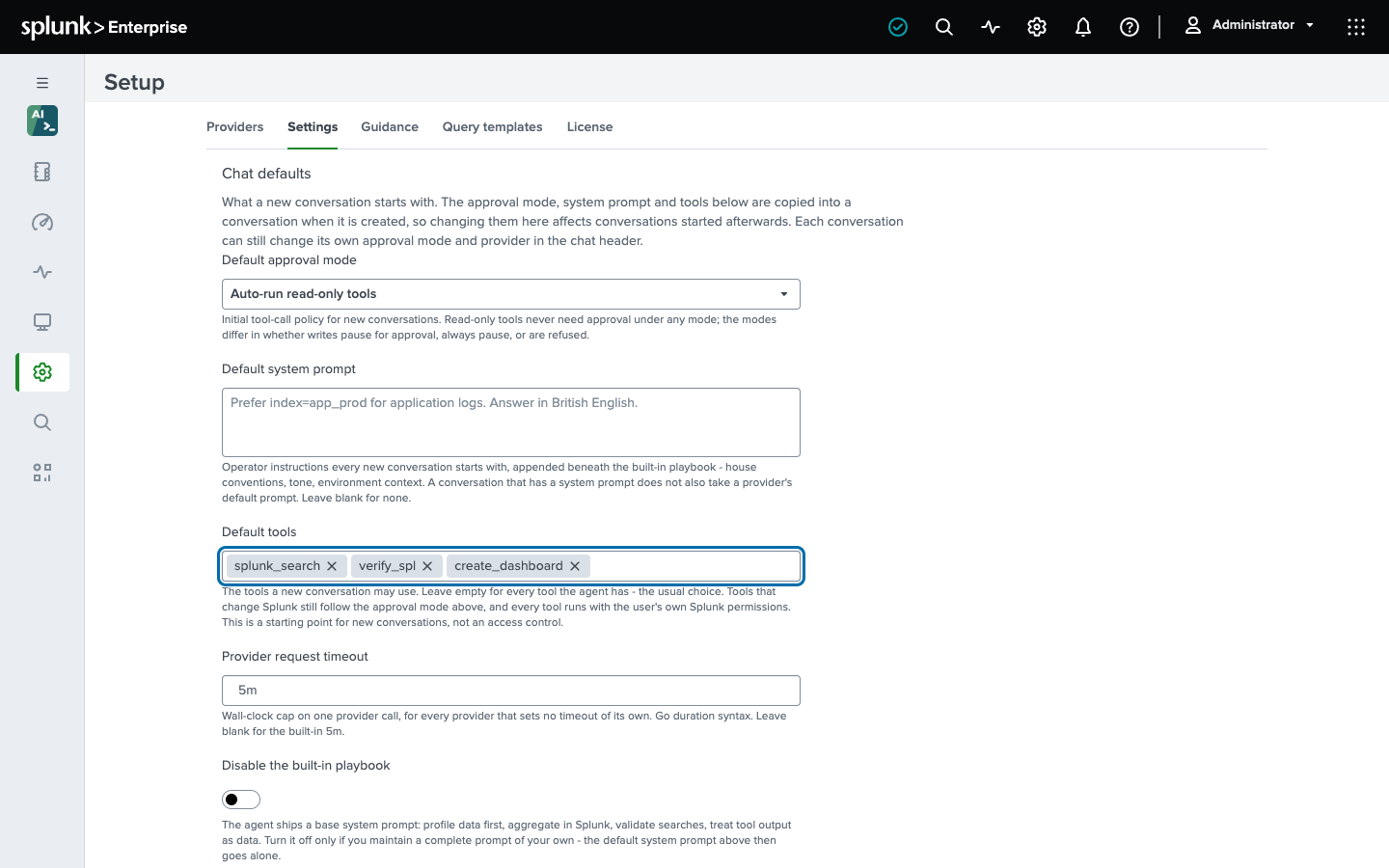
A field left blank keeps the built-in default, and the help under each field says what that default is. The search command and the REST handlers read a change on their next request; the background chat worker reads it at the start of its next pass - within seconds when it is idle, and once the pass in progress ends when it is busy. On Splunk Cloud the tab is the only way to set these values; on a self-managed search head you can also edit the file:
$SPLUNK_HOME/etc/apps/os_ai_agent/local/os_ai_agent.confAn app upgrade overwrites default/, so a value set there is lost on the next release; local/ always wins and survives upgrades, and the Setup page writes local/ for you. The bundled README/os_ai_agent.conf.spec is the exhaustive schema.
When you edit the file by hand, a boolean takes Splunk’s spellings in any letter case - true, t, yes, y, on, 1 and false, f, no, n, off, 0. A value the app cannot read - a misspelled boolean, a duration or number it cannot represent - is not ignored: it stops the whole file from loading, which stops Chat, | osai and the alert action until it is fixed. The Settings tab refuses such a value with a message naming the field, and it will not offer Save until it has read the stored values, so a form that failed to load cannot write its blanks over them.
Four settings take a full Splunk administrator (admin_all_objects; sc_admin on Splunk Cloud) to change: the license key and seat, turning the activity trail off, retention, and the add-on search commands. The app’s own administrator role sees them read-only, with a note saying why.
Chat defaults
The [chat] stanza, plus three settings of [settings]: the default provider, the global provider timeout, and how many conversations the worker runs at once.
The approval mode, the system prompt, and the tools are a new conversation’s starting point. They are copied into a conversation when it is created - from the chat page, the REST API, or the alert action - wherever the request names no value of its own. Changing one affects conversations started afterwards; an existing conversation keeps what it was created with, and its own approval mode stays the user’s to change. A complete import is the one create that does not take them: it reproduces a conversation, so the archive’s settings are kept exactly, empty ones included. A REST caller asks for the same with apply_defaults: false on the create.
| Setting | Default | What it does |
|---|---|---|
default_approval_mode | auto_approve_read_only | The tool-call policy a new conversation starts with: auto_approve_read_only (writes pause, reads do not), approve_all (every tool pauses), or approve_none (writes are refused). Each conversation can change its own. |
default_system_prompt | (empty) | Operator instructions every new conversation starts with, appended beneath the built-in playbook - house conventions, tone, environment context. A conversation that has a system prompt does not also take a provider’s default system prompt, which applies only to a request that carries none. |
default_tools | (empty) | The tools a new conversation may use, as a comma-separated list of tool names; the Settings tab offers the agent’s own list and marks the tools that change Splunk. Empty means every tool, which is the usual choice. Tools that change Splunk still follow the approval mode. This is a starting point, not an access control: a caller of the REST API can name a different list, and what a tool may read or change is always bounded by the user’s own Splunk permissions. See Tools. |
disable_builtin_system_prompt | false | Drop the built-in playbook - profile data first, aggregate in Splunk, validate searches, treat tool output as data - and send only your own prompt. For operators who maintain a complete prompt. |
disable_guidance | false | Send none of the situational notes (see below). |
max_guidance_bytes | 0 (4096) | How much guidance one turn may carry; it is re-sent on every provider call of the turn. |
disable_tool_result_compaction | false | Always send the full history. By default, every tool result goes to the model in full until a long conversation reaches three quarters of the prompt budget (the provider’s context window less the room held for the reply). Then the oldest bulky results go to the model as a short summary - the counts and field names the result reported, and the values the agent went on to use - in large steps, so the prompt a provider caches stays the same from one call to the next. The stored conversation and the chat page keep every result in full. Set Context window on every provider, since this measures against it (see Providers). |
[settings] default_provider | (empty) | The provider a conversation or a | osai search uses when it names none. The Providers tab writes it: the first provider you create becomes the default, Set default changes it, and deleting the default clears it. With exactly one provider configured, that one serves; with several and no default, requests that rely on it fail. |
[settings] request_timeout | 5m | Wall-clock cap on one provider call, for every provider that sets no timeout of its own. |
[settings] worker_concurrency | 4 | How many chat runs the background worker on one search head executes side by side; the rest wait as Queued. Each is a streaming connection to its provider plus its tool calls against Splunk, and on a search head cluster every member has its own pool. 1 runs them one at a time; the most is 32. |
1[chat]
2default_approval_mode = approve_all
3default_system_prompt = Prefer index=app_prod for application logs. Answer in British English.
4default_tools = splunk_search, profile_data, list_indexes, verify_spl, get_spl_command, current_time
Search commands the agent runs without asking
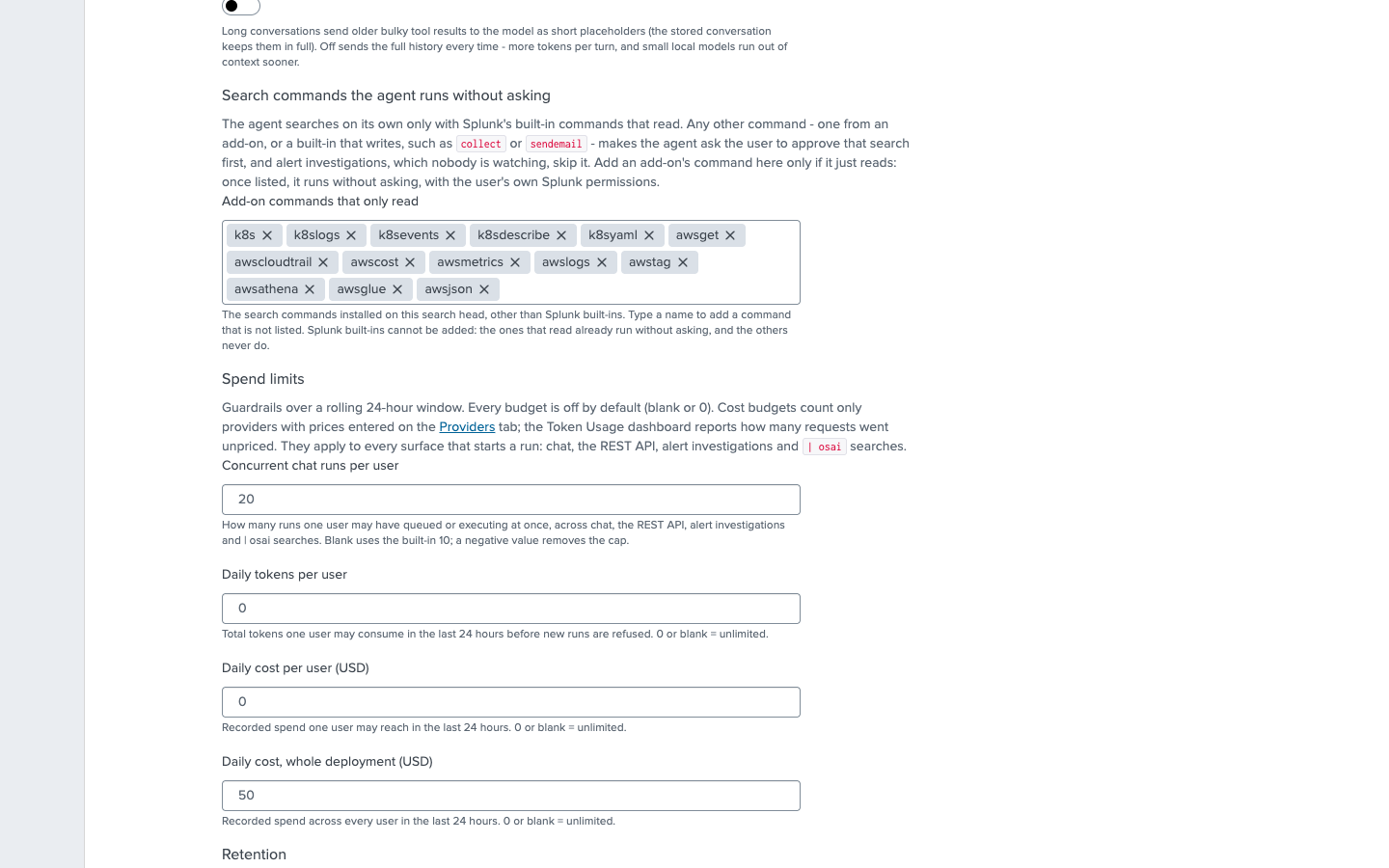
The [splunk_search] stanza, which only a full Splunk administrator may change. The agent’s splunk_search and profile_data tools run a search on their own only when splunkd’s parser shows that every command in it - macros, saved searches and subsearches expanded - is one of Splunk’s built-in commands that only read (search, stats, tstats, lookup, inputlookup and the like; not rest, map or collect), or one listed here. Anything else waits for a person to approve it in Chat, and alert investigations and | osai task= runs, which nobody is watching, do not run it at all. See Security.
| Setting | Default | What it does |
|---|---|---|
allowed_commands | (empty) | Add-on search commands that only read, which the agent may then run without asking - ldapsearch from the Splunk Supporting Add-on for Active Directory, say, or k8s from Kubernetes Search. A comma-separated list, matched regardless of case. The Settings tab offers the commands installed on the search head. The agent is told which commands are listed here (up to 40 by name), so it reaches for them for data that is in no index - a live AWS account or Kubernetes cluster these add-ons read - instead of concluding the data does not exist. |
A command listed here runs on every user’s behalf without approval, in unattended alert investigations too, so list only commands that read: one that creates a ticket, sends a message or writes data would do so with nobody watching. Splunk’s built-in commands cannot be listed - the ones that read already run, and the others never do; the Settings tab refuses a built-in name, and a hand-edited file ignores one.
1[splunk_search]
2allowed_commands = ldapsearch
Spend limits
The [limits] stanza. Every budget is off by default and enforced over a rolling 24-hour window, not a calendar day. Cost budgets count only providers you have priced. See Costs and limits for what is counted and what is not.
| Setting | Default | What it does |
|---|---|---|
max_active_jobs_per_user | 10 | How many chat runs one user may have unfinished at once, across Chat and the REST API: queued, executing, or paused on an approval card. A run that waits for approval keeps its slot until you approve, deny, or cancel it. A negative value removes the cap. |
daily_tokens_per_user | 0 (unlimited) | Total tokens one user may consume in the last 24 hours before new runs are refused. |
daily_cost_per_user_usd | 0 (unlimited) | Recorded spend one user may reach in the last 24 hours. |
daily_cost_usd | 0 (unlimited) | Recorded spend across every user in the last 24 hours. |
Retention
The [retention] stanza, which only a full Splunk administrator (admin_all_objects) may change - the app’s own administrator role sees it read-only. Chat state lives in KV Store - conversations, messages, finished job records, usage rows, feedback - and KV Store never ages anything out on its own. These settings, in days, bound it; the chat worker applies the cutoffs about once an hour, and on a search head cluster exactly one member sweeps each hour. 0 keeps forever.
| Setting | Default | What it does |
|---|---|---|
disabled | false | Turn the sweep off entirely. Nothing is deleted while this is true. |
trash_days | 7 | How long a deleted conversation and its messages survive - an undo window. |
jobs_days | 30 | How long a finished run’s execution record is kept: the bulkiest rows the app writes, duplicating what the conversation and the usage ledger already hold. Queued, running, and paused jobs are never touched by age. |
models_cache_days | 7 | The per-provider model list, refetched on demand. |
threads_days | 0 | Age out live conversations by last activity. This deletes history nobody asked to lose, so it is off unless you set it. |
usage_days | 0 | Age out the token and cost ledger. Shortening it shortens how far back the Token Usage dashboard can report. |
feedback_days | 0 | Age out the Helpful and Not helpful votes and their comments. |
The Health dashboard shows every collection’s size next to these settings.
Activity trail
The [audit] stanza, which only a full Splunk administrator (admin_all_objects) may change - the app’s own administrator role sees it read-only. The trail is one JSON event per agent turn, per tool call, per refusal, and per configuration change made on the Setup page, written to $SPLUNK_HOME/var/log/splunk/os_ai_agent_audit.log, which Splunk’s own default monitor indexes into _internal as sourcetype=os_ai_agent:audit. There is no index to provision. It records what nothing else can: which conversation changed a dashboard, which tool call made it, whether a person approved it or a policy did, what the agent was refused permission to do, and who changed the app’s configuration. The Activity Trail dashboard reads it; Security describes the events.
| Setting | Default | What it does |
|---|---|---|
disabled | false | Stop writing the trail. A change that turns it off through the Setup page is still written, as the trail’s last event, so the trail says who silenced it. |
max_file_size | 64MB | Size at which the log rotates. File only. |
keep_files | 2 | Rotated generations to keep. File only. |
Logging
The [logging] stanza.
| Setting | Default | What it does |
|---|---|---|
level | info | Master verbosity of the chat worker, the setup handlers, and the search command: trace, debug, info, warn, error, or fatal. Raise it while you reproduce an issue, then put it back. |
levels.<component> | - | Raise the level for one component without flooding the rest, for example levels.os_ai_agent/internal/provider/openai = debug for the OpenAI-compatible calls. The component list is in README/os_ai_agent.conf.spec. File only. |
Situational guidance
The Guidance tab, which writes [guidance:<name>] stanzas. A note is a short piece of guidance the agent appends to its system prompt when a request touches what the note covers, selected by whole-word match against the user’s message - so a note that applies to a tenth of requests costs a tenth of what it would as a permanent prompt. Nine ship with the app: alert-hygiene, dashboard-tokens, field-extraction, metric-indexes, null-handling, search-performance, subsearch-limits, time-bounds, and tstats-and-acceleration. All nine are about SPL and Splunk itself; none describes a particular product’s data, which is what your own notes are for.
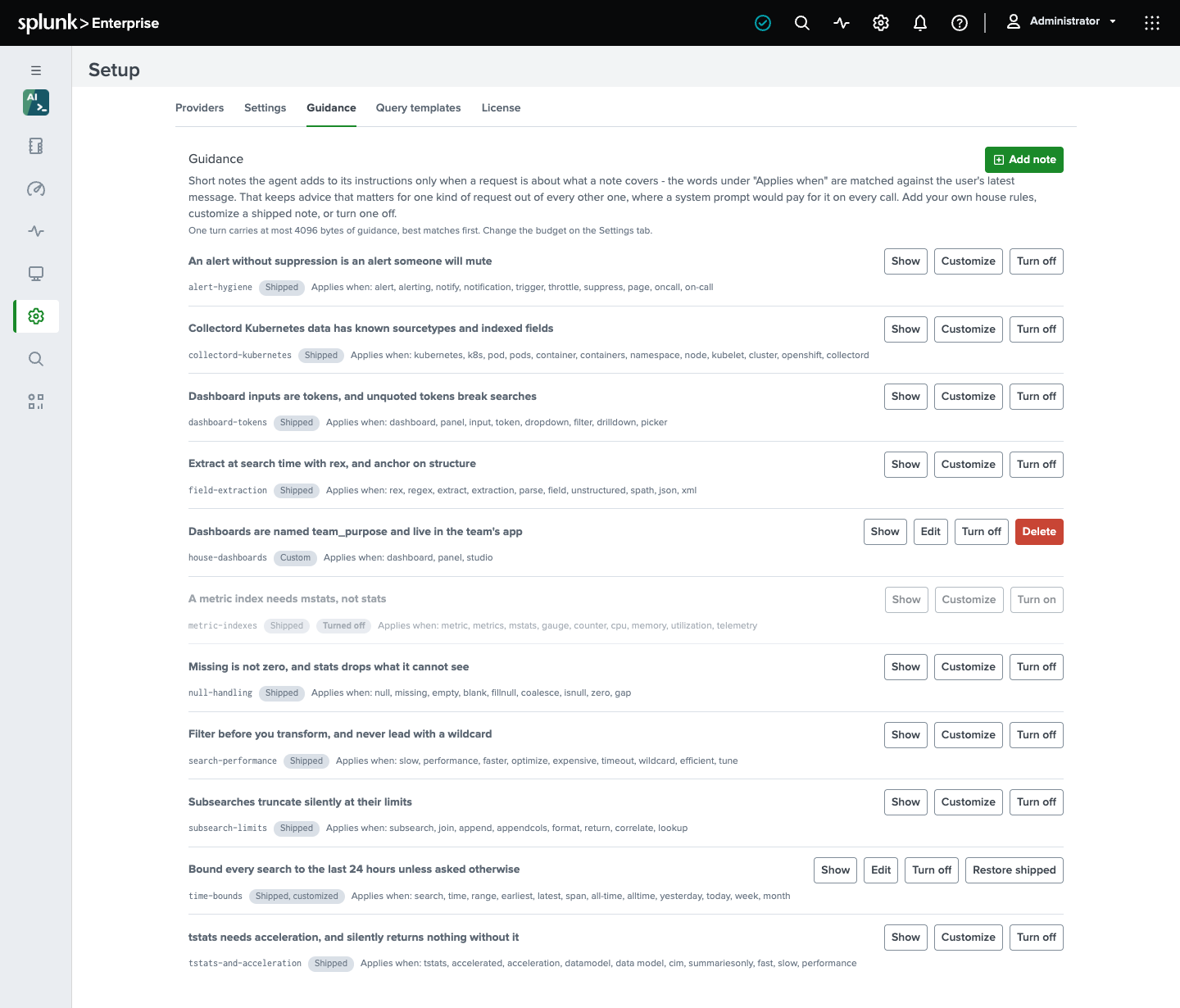
The tab lists every note, shipped and your own, with the words that bring it into a request. From there you can:
- Add note - your own house rule: a name, a title, the “applies when” words, and the note text in Markdown. Turn on Every request for a rule that genuinely applies to all work; it is then paid for on every provider call.
- Customize a shipped note. The form opens on the shipped text, and what you save replaces it. Restore shipped brings the original back.
- Turn off a note, shipped or your own, without losing its text, and Turn on to bring it back.
- Delete a note of your own.
The list is the agent’s own view, not a reading of the file. A note the agent will not use says so, and why: it has no title or no text, it has no “applies when” words and is not marked for every request, or it is larger on its own than the guidance budget for one turn, which the agent would otherwise skip silently on every request. If a customized shipped note is refused, the row says the shipped text is still the one in effect; a customized note that is only too large has still replaced the shipped one, so the row says that neither is sent. Disable situational guidance and the guidance budget are on the Settings tab.
In the file, a note is a stanza with a title, the words that put it in scope, and a body in Markdown; a stanza named after a shipped note replaces it, and disabled = true on such a stanza removes it:
1[guidance:payments-index]
2title = Payments application logs live in index=payments, not index=app
3match = payments, checkout, cart
4body = The payments team's services log to index=payments with sourcetype=payments:api. \
5  Latency is in the field duration_ms. Never search index=app for them.
6
7[guidance:alert-hygiene]
8disabled = true
Multi-line bodies continue a line with a trailing backslash. Set always = true on a note that genuinely applies to every request - it is then paid for on every provider call. A note’s name is lowercase letters, digits, -, and _; the agent compares names without regard to letter case, so a hand-written [guidance:Payments-Index] is the note payments-index on the tab.
Outbound proxy
Provider requests follow the proxy Splunk itself is configured with - [proxyConfig] in server.conf - by default; see Providers. To keep every provider off that proxy, set use_splunkd_proxy = false in the [settings] stanza. This one is file only.
1[settings]
2use_splunkd_proxy = false
Connection to splunkd
The [splunk] stanza governs how the app reaches the local splunkd REST API for credential lookups and the agent’s own tools - not how it reaches your provider. The defaults match a standard install and pin the connection to splunkd’s own certificate on loopback; you will not normally change them. README/os_ai_agent.conf.spec documents request_timeout, tls_ca_file, tls_cert_file, tls_server_name, tls_server_name_from_cert, and tls_insecure in full.
The chat worker
The background input that runs chat jobs is os_ai_agent_worker://default in the app’s inputs.conf, enabled with a 60-second interval. It runs the queued work of Chat, | osai and the alert action, and does no external egress until a job exists. Manage it like any modular input under Settings - Data inputs; disabling it stops all three from answering and stops the retention sweep, and the Health dashboard, the health endpoint and a bulletin message say so.
A second input, the scripted os_ai_agent_health.py, checks every 5 minutes on each search head, as splunk-system-user, and posts Splunk bulletin messages - the bell in the Splunk bar - for a license problem, more users than the license covers, a stopped worker, or a provider refusing its stored API key, removing each once its problem ends; Troubleshooting lists them. It calls no provider, and logs one line per run to splunkd.log (index=_internal "os_ai_agent health"). To stop the messages, disable it under Settings - Data inputs - Scripts; the ones already posted last until splunkd restarts.