| osai calls the agent from SPL. It is a generating command - it goes first, after the leading | - and it has three modes: a free-form prompt, an explanation of a search, and a full investigation with the read-only tools. Because it is ordinary SPL, it can be saved, scheduled, and delivered by any alert action, which is how you get a recurring agent report with no extra infrastructure.
Running it requires the use_os_ai_agent capability. See Security.
| osai (prompt=<string> | explain=<spl> | task=<instruction>)
       [provider=<name>] [model=<id>] [system=<string>]
       [temperature=<float>] [max_tokens=<int>] [run_as=<user>]
[decision_index=<index> decisions=<string>]| Argument | Description |
|---|---|
prompt= | Send a prompt and emit the response as one event. |
explain= | Explain a search stage by stage (see below). |
task= | Run an unattended agent investigation and emit a self-contained report (see below). |
provider= | A configured provider. Default: the app’s default provider. |
model= | Override the provider’s default model. |
system= | A system prompt for this call. With prompt= only. |
run_as= | With task= only: the Splunk user an app-shared scheduled search’s investigation runs as, and whose Chat receives the conversation. That user must hold use_os_ai_agent and run_os_ai_agent_alerts (see below). |
decisions= | With task= only: what the run has to decide and the answers each decision allows, one decision per ; - decisions="page: yes, no; severity: high, medium, low". The JSON form works too, with its quotes escaped: decisions="{\"page\": [\"yes\", \"no\"]}". Set it together with decision_index=. See Decisions. |
decision_index= | With task= only: the index the run’s decisions are written to, as one event when it concludes. |
temperature=, max_tokens= | Forwarded to the provider; omitted means the provider’s default. With prompt= only: explain= and task= run the agent with its own settings, so of the model settings they take just provider= and model=. |
Quote values that contain commas or spaces - prompt="...", system="...". SPL splits unquoted arguments on both, and rather than answering a truncated prompt the command rejects a stray fragment with an error that names it and shows the quoted form. Unrecognized parameters are rejected the same way. The command refuses inline credential parameters (api_key=, token=, and similar): credentials come from the configured provider only. Never type a secret into a search. Splunk records the search text in search history, the audit index, and the dispatch directory before any command sees it, so a secret the command refused has still been written down - rotate it.
Output
One event per provider call, not one per streaming token. Fields:
| Field | Meaning |
|---|---|
_raw | The response text. |
role | assistant for the answer. Thinking models (Qwen 3, DeepSeek R1, and others) emit a second event with role=assistant_thinking carrying the reasoning trace. role=error when the call failed. |
provider, model | Who actually answered - after an automatic failover, the fallback that served the call. |
Drop the reasoning row from a thinking model and keep just the answer:
| osai prompt="..." | where role="assistant"prompt= - a completion
A prompt= run is a plain completion: no tools are offered to the model, and the system message is exactly your system=, or none.
| osai prompt="Summarize the three most common causes of a 503 from an API gateway, in one paragraph"| osai prompt="Classify this stack trace" provider=local-lmstudio model=qwen/qwen3.6-35b-a3b| osai prompt="Generate five search tips for a new analyst" provider=openai-prod temperature=0.4 max_tokens=300explain= - explain a search
The agent verifies that the search parses, breaks the pipeline down stage by stage - consulting the embedded SPL reference for any command it is not certain about rather than guessing - optionally grounds the explanation against a small, tightly bounded sample of real events, and returns a markdown explanation with the fields each stage creates, pitfalls, and performance notes. Only read-only tools run during an explain.
| osai explain="index=payments sourcetype=api | stats count by status | sort -count"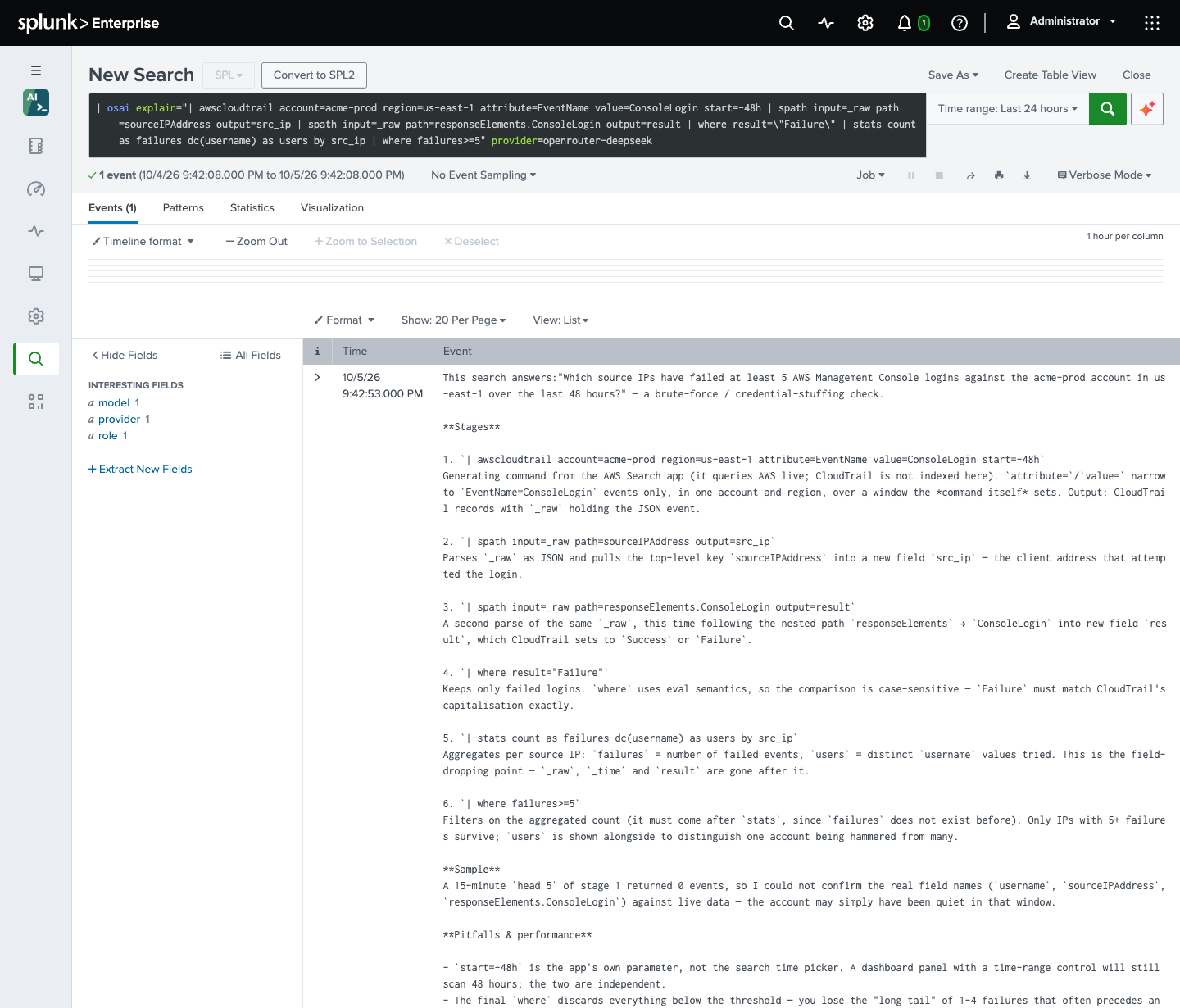
task= - an unattended investigation
The agent runs a full investigation with its read-only tools - search, discovery, verification - and emits a self-contained markdown report. It creates and modifies nothing in Splunk, and it never pauses for an approval nobody is there to give. Designed for scheduled saved searches: put it on a cron and attach an email or webhook action to deliver the report.
Give it decisions= and decision_index= and the run also answers the decisions you define, choosing only from the answers you list, and records them as one event for an alert of yours to act on. The agent itself never acts. See Decisions for the rules and the event.
| osai task="Check every index for ingestion gaps in the last 24 hours and report anything unusual"| osai task="Review the alerts that fired in the last week: which fire most, which never trigger, and which have no suppression"| osai task="Decide whether the payments API error rate warrants paging on-call" decision_index=agent_decisions decisions="page: yes, no; severity: high, medium, low"Every run is a chat job
The command does not call the model from inside the search process. It creates a conversation in Chat - owned by the user running the search, titled after the request - submits the run as a job, and waits for the app’s background worker to finish it, the same way the chat page does. Three things follow.
The run is gated and metered like a chat turn. The
[limits]budgets andmax_active_jobs_per_userapply to it, it is written to the usage ledger, and a refused search returns no rows and names the budget in the job inspector. Itsturnevent in the activity trail carries tokens and cost:index=_internal sourcetype=os_ai_agent:audit event=turn surface=spl | stats sum(tokens_in) sum(tokens_out) sum(cost_usd) by userThe full answer stays readable in Chat, under the sidebar’s Search tab, which also means a daily scheduled report leaves a conversation per run in that user’s list;
[retention] threads_daysages them out, or the user deletes them.The search holds a search slot for as long as the run takes. The worker picks a job up within seconds, so the added latency is small, but a run nobody picks up within fifteen minutes is cancelled and the search says what the health check knows about the worker. The command needs the worker modular input running, as chat does.
A run acts as a person. A scheduled search owned by nobody - one shared at app level - runs as splunk-system-user, so give it task="..." run_as=<user> and the run acts as that user, on a token minted for them, the way an app-shared alert action does. As for such an alert, the named user must hold use_os_ai_agent and run_os_ai_agent_alerts - the os_ai_agent_alerts role ships with both for exactly this - the search head needs splunkd token authentication enabled, and run_as= is accepted with task= only. A search owned by a person may name somebody else only when its owner holds edit_tokens_all, Splunk’s authority to mint tokens for other users. prompt= and explain= run as the search’s own user.
The usage ledger and the activity trail record what started each task= run: a saved search as search:<saved search name>, and one typed into the search bar as search (ad hoc). The Token Usage dashboard’s Unattended tab totals spend by that trigger.
Right after upgrading the app without restarting splunkd, a | osai search may refuse to run and say that the REST handlers predate the command: splunkd’s handler processes outlive an app reload, and the command will not run under a handler that does not admit it as a search-command run. Restart splunkd, or wait for the handler processes to recycle.
Why it works this way: a search command runs under the calling user’s identity, so running the model call inside it would put the provider API key in a process that user controls. Handing the run to the worker keeps every key out of that user’s reach; see Security. See Alerts and schedules for the alert-triggered counterpart and Costs and limits for the accounting.