Blog
Less log volume in Collectord 26.10: group repeats, fold storms, find the costly patterns
Most of what Collectord sends to Splunk is logs, and Splunk licenses the text of each event. When a workload writes the same line over and over - a health check, a “waiting for leader” loop, a reconnect message - every copy costs license and disk. Collectord 26.10 adds three ways to find that noise and send less of it, each off until you switch it on.
Each also costs something: CPU and memory in Collectord, and the report has license of its own. Switched on everywhere, they can cost more than they save. Here is what we measured, so you can switch each on where it pays.
Three features, one switch each
- Group repeated lines. Collectord sends the first line, then one event that counts its repeats. Only the copies are left out.
- Fold storms of alike lines. Collectord sends the first 60 lines of a pattern each minute, then one summary that counts the rest. This one is lossy.
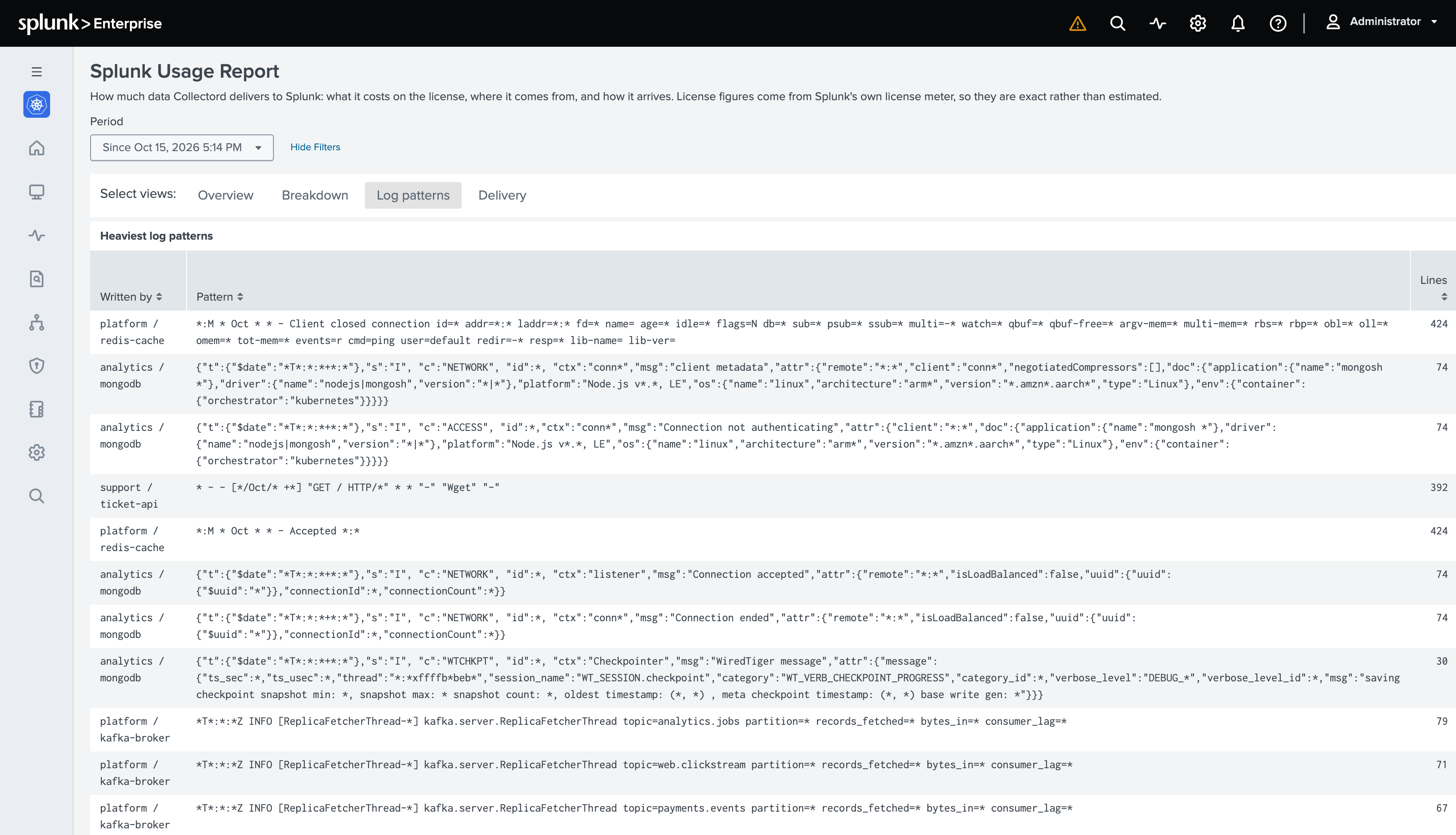
- Report the costliest log patterns. Your logs go out unchanged, plus a report of the patterns that cost the most.
For one workload, the switch is an annotation on a pod, a workload, a namespace or a Configuration on Kubernetes and OpenShift, or a container label on Docker and Podman: collectord.io/logs-repeat-enabled=true, collectord.io/logs-fold-enabled=true or collectord.io/logs-patterns-enabled=true.
For every workload, or a host’s logs, set repeatEnabled = true, foldEnabled = true or patternsEnabled = true in [input.files] for container logs, [input.app_logs] for volume logs, an [input.files::<name>] section for a host’s log files, or [input.journald] for the journal. The Helm charts carry the same keys under collectord.configuration.inputs. Read what each one costs before you switch it on for everything.
What each costs, and what it saves
| Feature | What it saves | What it costs in Splunk | Collectord’s CPU, worst case | Collectord’s memory, worst case |
|---|---|---|---|---|
| Report the patterns | Nothing by itself: it shows where the other two pay | Up to 20 events per stream every 15 minutes, about 300 licensed bytes each | 8% more | 0.4 MiB per stream |
| Group repeated lines | 17.7% of the bytes, nothing lost | Grouped lines arrive up to a minute late | No measurable change | 0.7 MiB per stream |
| Fold storms | 15.1% of the bytes | The lines past the first 60 a minute of a pattern | 5% more | 0.6 MiB per stream |
The savings come from 18 days of one OpenShift cluster’s container logs, 6.0 million lines in 1.24 GB, run through each feature at its defaults. Yours depend on how your workloads log. A reconcile loop that repeats the same warnings saves a lot. A log where every line carries a request ID saves next to nothing from grouping.
We measured Collectord’s cost with Collectord for Docker reading 10 containers that each write 1,000 lines of 1 KB a second. The lines were built so that no two repeat or share a pattern: the worst case, with nothing to save and the most to track. With the features off, Collectord used 0.36 of a core and 22.5 MiB. With all three on, it used 0.43 of a core and 38 MiB, about 7 microseconds of CPU per line. Memory grows with the number of streams, not lines: each feature keeps at most 256 KB of state per stream, a container’s stdout or stderr, and with lines that fill every table, all three cost about 1.5 MiB per stream. With 100 containers writing the same 10,000 lines a second, Collectord used 198 MiB instead of 45 MiB, while its CPU grew by the same 0.07 of a core. On a node with many busy containers, that memory is what switching everything on costs.
Start with the report, where you pay the most
The report costs license of its own, and as much on a quiet stream as on a busy one. Every 15 minutes, each stream sends its 20 heaviest patterns - its lines alike but for their numbers - as events of their own, about 300 bytes each. On our demo cluster that came to about 1.6 KB per stream every 15 minutes, or 150 KB a day. For a stream that logs gigabytes a day, that is nothing. For a quiet stream, it is more than its logs: in 12 hours, three quiet namespaces on our demo cluster sent about 0.5 MB of logs each, and 0.6 to 1.2 MB of reports.
So don’t switch it on for everything. Open Setup › Splunk Usage Report first: its Breakdown tab shows the licensed volume by namespace, pod, container, image, node and stream, from Splunk’s own license meter, with no report needed. Switch the report on for the few workloads at the top, such as a namespace:
1apiVersion: v1
2kind: Namespace
3metadata:
4  name: payments
5  annotations:
6    collectord.io/logs-patterns-enabled: "true"
The reports go to the same index as the lines they count, under a source type of their own, such as kubernetes_logs_patterns, so no search that counts log lines finds them. Monitoring Kubernetes, OpenShift, Docker, Linux and macOS show them in the Usage Report’s Log patterns tab: the heaviest patterns with who wrote them, the lines and megabytes they sent, a trend and an example line. A day of reports shows where grouping or folding pays. Then switch the report off, or keep it on the workloads you watch.
Group repeated lines
When a stream writes the same line again and again, Collectord sends the first one at once and holds the repeats for up to a minute. Then it sends one event in their place, the first repeat as it was written, with collectord_repeat_count saying how many lines it stands for.
Lines are compared byte for byte, leaving out only the line’s own timestamp. A line is a repeat of any of the stream’s last 256 distinct lines, so the cycles of a failing reconcile loop group too.
For example, a controller that cannot reach its database writes this pair every two seconds, 60 lines a minute:
12026-10-26T09:15:00.000Z WARN  reconcile  failed to sync payments/orders-db: dial tcp 10.96.14.7:5432: connection refused
22026-10-26T09:15:00.000Z INFO  reconcile  requeue payments/orders-db after 2s
32026-10-26T09:15:02.000Z WARN  reconcile  failed to sync payments/orders-db: dial tcp 10.96.14.7:5432: connection refused
42026-10-26T09:15:02.000Z INFO  reconcile  requeue payments/orders-db after 2s
5... the same pair every two seconds, to 09:15:58
With grouping on, Splunk gets four events for that minute. The first pair goes out at once. After the hold, one event stands in for each line’s other 29 copies: the first copy as it was written, with collectord_repeat_count, the lines it stands for, and collectord_repeat_span, the seconds from the first copy to the last:
| Event in Splunk | collectord_repeat_count | collectord_repeat_span |
|---|---|---|
2026-10-26T09:15:00.000Z WARN reconcile failed to sync payments/orders-db: ... | ||
2026-10-26T09:15:00.000Z INFO reconcile requeue payments/orders-db after 2s | ||
2026-10-26T09:15:02.000Z WARN reconcile failed to sync payments/orders-db: ... | 29 | 56 |
2026-10-26T09:15:02.000Z INFO reconcile requeue payments/orders-db after 2s | 29 | 56 |
The copies say nothing the count does not, and only their times are left out. logs-repeat-offsets keeps those too, as collectord_repeat_offsets.
On the OpenShift cluster’s logs, grouping left out 17.7% of the bytes at the default one-minute hold, and 24.5% with a five-minute hold. Operators and reconcile loops repeat in cycles: the cluster-version operator, 21% of all the bytes, repeats a ten-line block every few seconds, and 83% of its lines repeated one from the last five minutes. Grouping does not reach a crash-looping pod, whose every restart is a new container, or lines that carry a request ID.
To group the repeated lines of every workload in a namespace:
1apiVersion: v1
2kind: Namespace
3metadata:
4  name: payments
5  annotations:
6    collectord.io/logs-repeat-enabled: "true"
Grouping costs you time, not lines. A grouped event carries its first repeat’s time and arrives up to the hold later: logs-repeat-maxspan sets it, 1m by default and 10m at most. Leave grouping off for streams whose identical rows are the data, such as nvidia-smi dmon samples.
Fold storms of alike lines
A retry loop or a chatty access log writes lines that are alike rather than equal, which grouping does not catch. Two lines are alike when they differ only in their numbers - ids, addresses, ports, counts, durations, times - and come from the same stream and writer.
Folding catches those, at a price. Each minute, the first 60 lines of one pattern go out as they are. Collectord drops the rest, and when the minute is over it sends one summary in their place: the first line it dropped, with collectord_fold_count, the lines it stands for, and collectord_fold_bytes, their size.
For example, a catalog server answers 300 calls in one minute and logs each with its latency, and one call fails:
1time="2026-10-26T09:16:00Z" level=info msg="finished unary call with code OK" grpc.code=OK grpc.method=GetBundle grpc.time_ms=0.020
2time="2026-10-26T09:16:00Z" level=info msg="finished unary call with code OK" grpc.code=OK grpc.method=GetBundle grpc.time_ms=0.057
3... 297 more like them, alike but for their time and latency, and at 09:16:30:
4time="2026-10-26T09:16:30Z" level=error msg="finished unary call with code Unavailable" grpc.code=Unavailable grpc.method=GetBundle grpc.time_ms=5000.214
With folding on, Splunk gets 62 events for that minute:
| Event in Splunk | collectord_fold_count | collectord_fold_bytes |
|---|---|---|
time="2026-10-26T09:16:00Z" level=info ... grpc.time_ms=0.020 | ||
… the first 60 lines as written, to time="2026-10-26T09:16:11Z" level=info ... grpc.time_ms=0.043 | ||
time="2026-10-26T09:16:12Z" level=info ... grpc.time_ms=0.080 | 239 | 31309 |
time="2026-10-26T09:16:30Z" level=error ... grpc.code=Unavailable ... grpc.time_ms=5000.214 |
The summary goes out once the minute is over. It stands for the other 239 lines, 31 KB of the minute’s 39 KB: the first of them as written, with how many there were and their size. The error goes out too, since a line matching error is never folded.
On the OpenShift cluster’s logs, the default of 60 lines a minute folded 15.1% of the bytes, 30 a minute folded 17.4%, and 10 folded 22.1%. Most of it was a catalog server’s gRPC request lines, alike but for their latency - exactly what a fold gives up.
What you give up is the dropped lines: the ids, addresses and durations that made each one different, and the time each was written. What you keep is the first 60 lines, one example of the rest, and how many there were. Lines that match (?i)error|exception|fatal|panic are never folded, and neither are lines you exempted from the thruput caps. logs-fold-maxperminute changes the 60. logs-fold-keep replaces the keep pattern, so include the default’s words if you still want them kept.
Fold where the report shows one pattern taking most of a stream’s volume, and the lines past the first 60 a minute add nothing the count does not.
Count lines, not events
Once a stream groups or folds, one event can stand for many lines, so count lines: in Splunk, sum(eval(coalesce(collectord_repeat_count, collectord_fold_count, 1))). The monitoring apps’ dashboards and Alert Catalog templates already count this way. Grouped events arrive up to the hold after their first line and fold summaries once their minute is over, so give a scheduled search over such a stream that much lag.
Where it works
All three work on container logs on Kubernetes, OpenShift, Docker and Podman, and on volume logs with collectord.io/volume.<n>-logs-repeat-enabled and its fold and patterns twins. On Linux they work on host log files and the journal, and on macOS on the log files Collectord reads, not the unified log.
The ElasticSearch and OpenSearch forwarders have all three. Into a syslog output, a stream groups only when its syslog.format names {{collectord_repeat_count}}, folds only when it names {{collectord_fold_count}}, and carries no pattern report.
Get started
Open the Breakdown tab of the Splunk Usage Report and switch the pattern report on for the few workloads at the top. A day later, open the Log patterns tab: group where it shows the same lines again and again, fold where one pattern takes most of a stream, and leave the rest of your workloads as they are. Every key and default is in Reduce log volume, and the annotation references for Kubernetes, OpenShift and Docker list every variant. For the rest of the release, read the Collectord 26.10 post.
Tell us what your report shows - we would love the feedback.