Blog
Collectord 26.10: the metrics index, dashboards that lead to the cause, and the Alert Catalog
Collectord 26.10 ships today for Monitoring Kubernetes, OpenShift, Docker and Linux, for the new Monitoring macOS, and for the ElasticSearch, OpenSearch and syslog forwarders. It is the first release that brings together work we started in 2019, work that kept waiting on other work.
Four things come together in it:
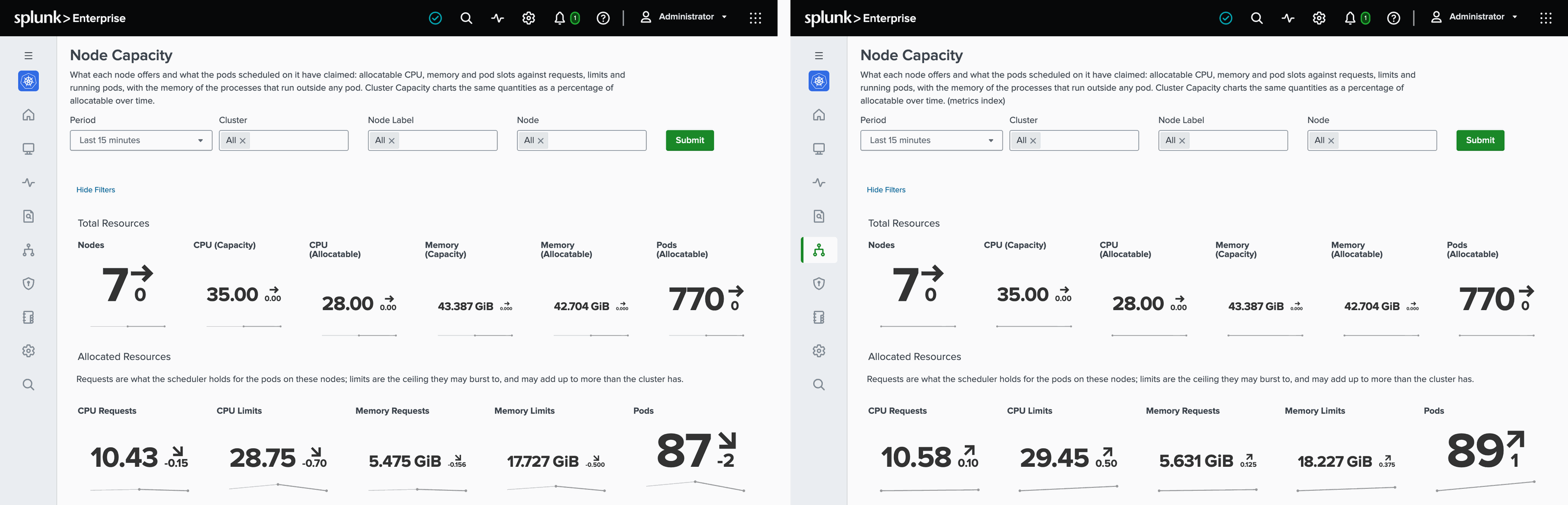
- Splunk metrics index support. Every stats input can now send to a metrics index. To ship it, we rewrote the dashboards: every stats dashboard comes in two sets, one that reads the events index and one that reads a metrics index.
- The license cost of an upgrade. We measured each new input and field for what it adds to your license before it went in, and an upgrade keeps sending your data where it goes today.
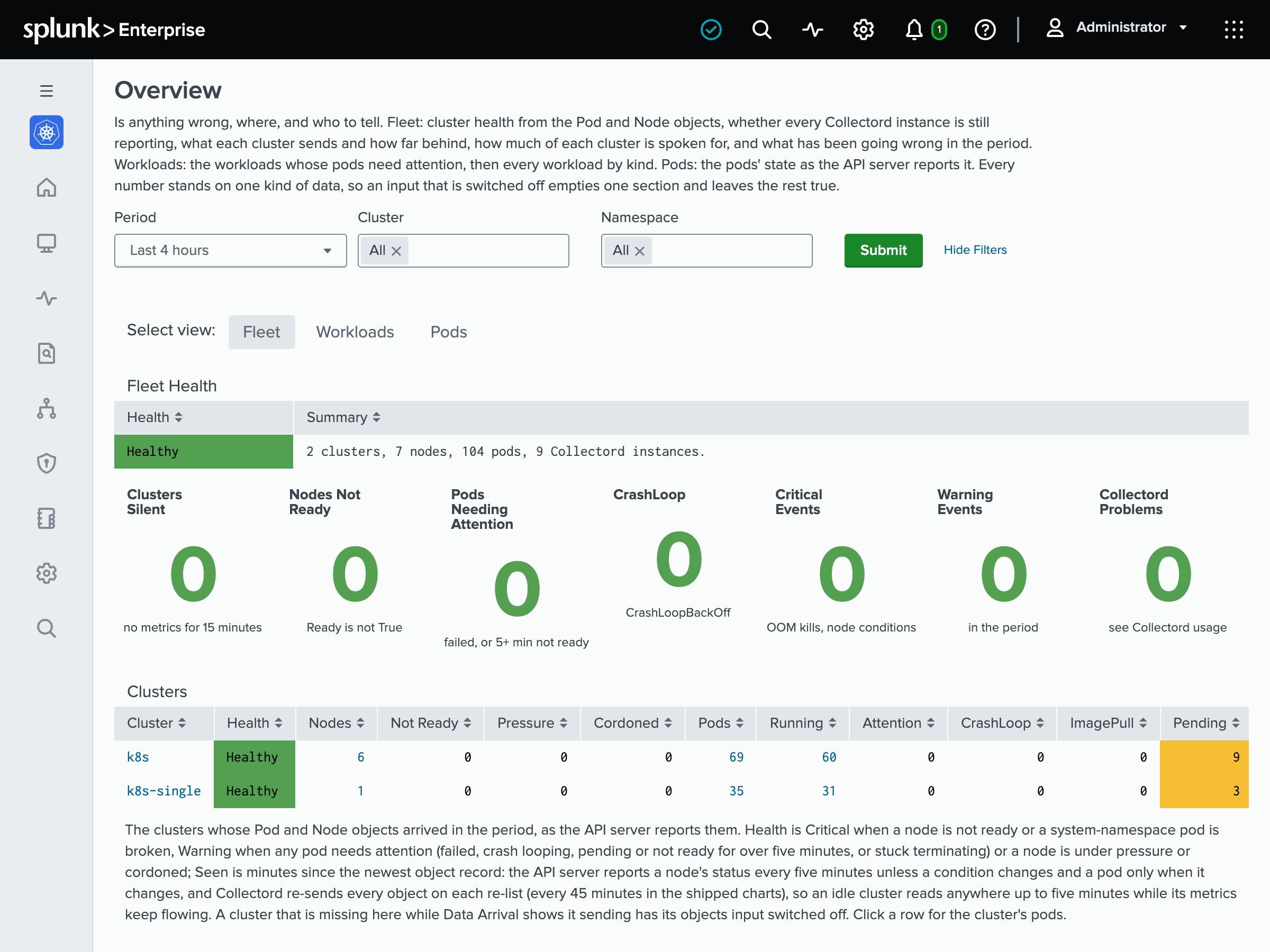
- Dashboards you act on, not only look at. Monitoring Kubernetes, OpenShift and Docker open on an Overview that says whether anything is wrong and where, and its tiles and rows drill down to the page that shows the cause.
- Alerts each team owns. The Alert Catalog replaces one fixed set of alerts with templates each team picks, scopes to its own clusters and namespaces, and creates as saved searches it owns.
The metrics index, and two sets of dashboards
Each stats input - hosts, containers, processes, network, filesystems, disks, Prometheus metrics, Collectord’s own metrics - takes indexType = metrics, or both while you compare. The new Setup › Configuration page switches the app’s menu between the events-index dashboards and their metrics-index twins, which read the stats with mstats and look the same.
Which index to use is your call, and nothing moves until you change it. Measured on a Kubernetes cluster with Splunk 10.4, the same samples in a metrics index cost about 1.5 times the license, take about half the disk, and aggregate 4 to 7 times faster. See Metrics index for Kubernetes, OpenShift, Docker and Linux.
Dashboards that lead to the cause
Monitoring Kubernetes and OpenShift open on an Overview with one verdict for the fleet - Healthy, Warning, Critical, or Unknown when the data to decide is missing - the numbers behind it, and a row per cluster; on their Events pages, a click on a crash loop or an OOM kill opens that pod’s logs. Docker’s Overview shows the silent hosts, Collectord problems and containers that need attention. In every app, the Splunk Usage Report now reads Splunk’s own license meter. See Dashboards for Kubernetes, OpenShift, Docker and Linux.
The Alert Catalog
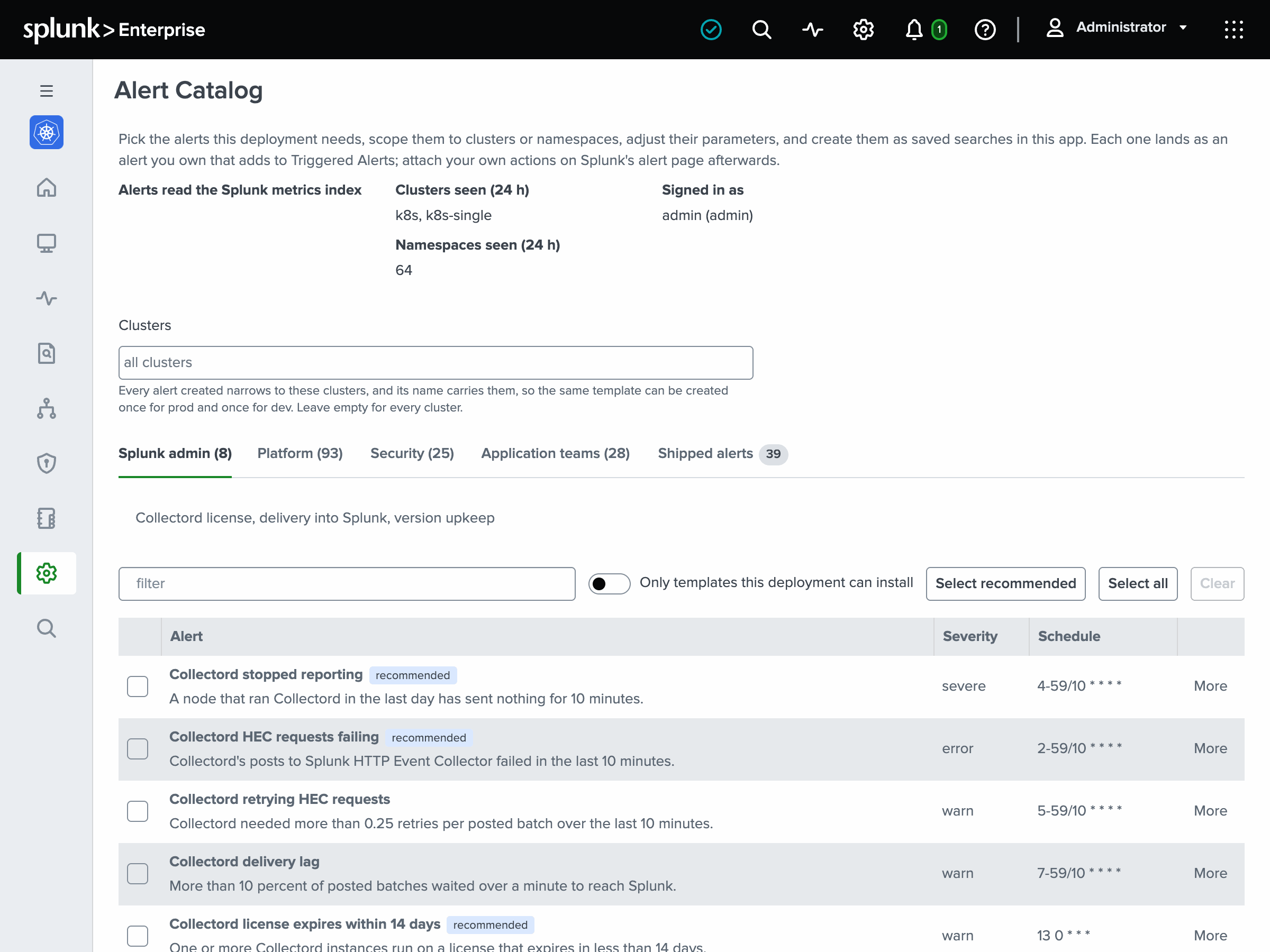
Each app has an Alert Catalog under Setup › Alert Catalog: 118 templates in Monitoring Kubernetes, 117 in OpenShift, 61 in Docker, 45 in Linux and 42 in macOS, grouped by who acts on them, from Splunk admins to application teams. Scope them to clusters and namespaces, adjust their thresholds, and create them as saved searches you own. The name carries the scope, so the payments team gets Kubernetes: Pod crash looping [cluster prod; namespace payments] and every other team its own copy. The alerts the apps shipped before keep running, marked deprecated, until a later release removes them. See Alert Catalog for Kubernetes, OpenShift, Docker, Linux and macOS.
Kubernetes and OpenShift
Collectord runs as one DaemonSet instead of two and finds the control plane’s components as pods on its own node (see Where the scrapes run for Kubernetes and OpenShift). It runs under the built-in system-node-critical and system-cluster-critical priority classes, so the kubelet no longer evicts it under disk pressure. The ClusterRole reads Secrets with get only and drops nodes/proxy, and the addon no longer runs privileged. A new Audit menu reads the API server audit log, from detections to the timeline of one object (see Audit logs for Kubernetes and OpenShift).
The ElasticSearch and OpenSearch and syslog forwarders get the same single DaemonSet, which now reads the API server’s audit logs by default, and the same priority classes.
Docker, Swarm, Compose and Podman
Collectord reads Docker Swarm’s services, tasks and nodes on the Swarm’s leader, and Swarm Services and the Alert Catalog watch them (see Docker Swarm). A new Compose Projects dashboard goes from projects to services and containers: replicas, health checks, restarts and error lines. Collectord monitors the containers of rootless Podman users, and reads each container’s logs through that container’s own logging driver, json-file or journald, so one started with its own --log-driver is no longer missed.
Linux
Monitoring Linux gets its biggest update since we launched it in 2019. collectorforlinux installs from our signed apt and yum repositories, for amd64 and arm64: add the repository, install it with apt-get, dnf or zypper, fill in 002-user.conf, and enable the service. Each new release arrives with your next upgrade, upgrades keep your configuration, and installing never starts the service before it is configured.
The new Inventory dashboard lists what each host is - distribution, kernel, CPU, memory, hypervisor - and its pending package updates, security updates first. The new Services dashboard reads what systemd says: the units failed now, restarting in a loop, reached by the OOM killer or logging errors, and what each unit’s processes use. Collectord names the systemd unit of every journal entry and every process, so a log line or a CPU spike is one search away from its service. Host adds pressure, paging, TCP retransmits, the conntrack table and the clock, and Network is rebuilt around interfaces, connections and listening ports. See Installation and Dashboards.
Monitoring macOS
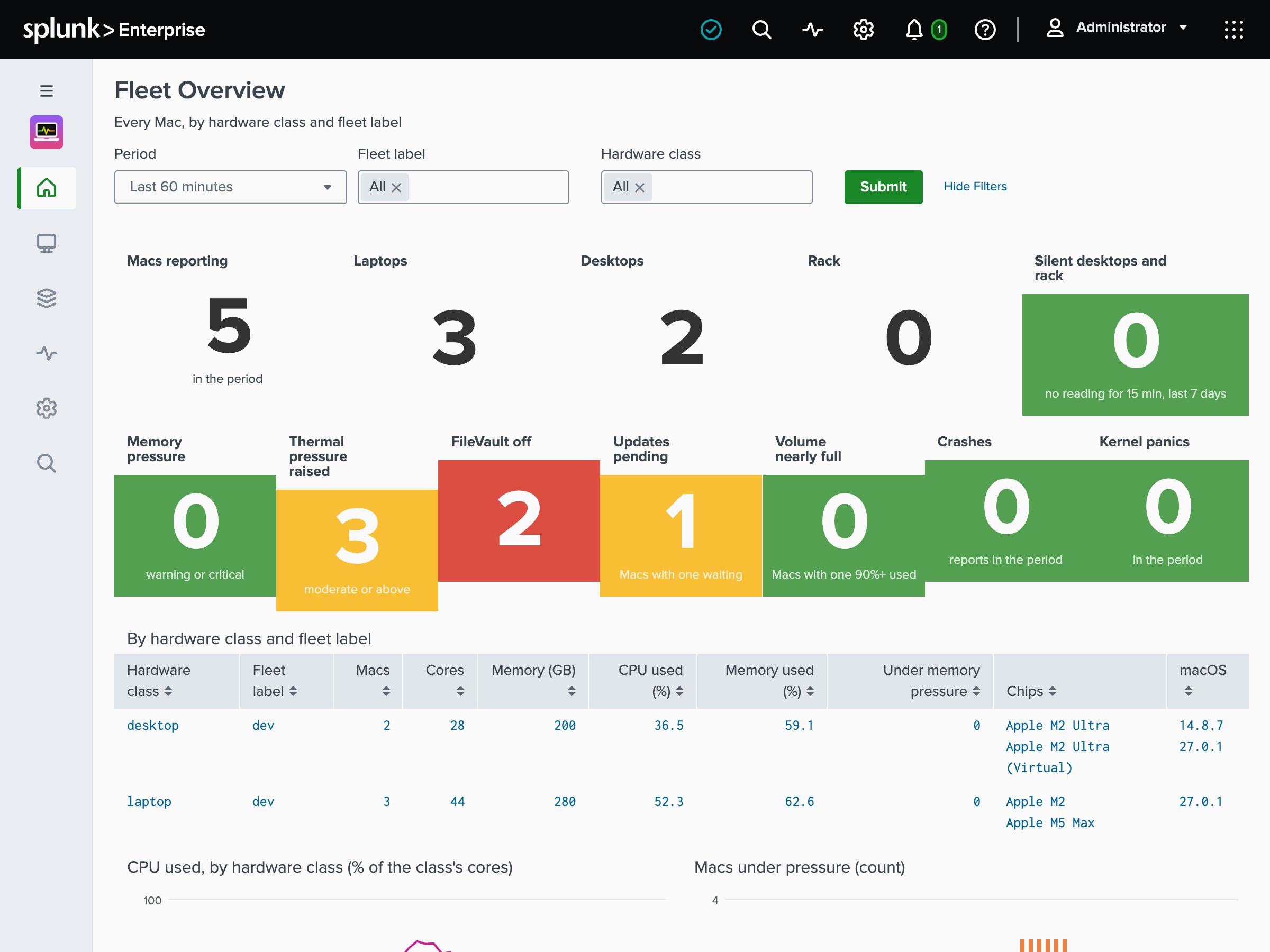
Monitoring macOS is new, for teams that run CI and build fleets, inference clusters and virtual machine hosts on Macs, and for IT keeping Macs healthy. Collectord runs on Apple Silicon Macs with macOS 14 or later, from a package, a Homebrew cask or your MDM. It sends CPU, memory pressure, GPU, power, thermals, processes and virtual machines to a metrics index, and the unified log, crashes, logins and launchd services to an events index. It needs no Full Disk Access, and each source that names people or programs has its own switch. More in Meet Monitoring macOS, and the Monitoring macOS docs.
Less log volume
Three new Collectord features, off until you switch them on with an annotation, a container label or a configuration key: send repeated lines as one event that counts them; fold storms of alike lines into one summary a minute, which is lossy but keeps every line that names an error (on 18 days of one cluster’s container logs it folded 15% of the bytes); and report each stream’s heaviest log patterns in the Splunk Usage Report. Start with the report. More in Less log volume, and the Reduce log volume docs.
Enterprise Security and the CIM
The apps map what Collectord already forwards to the Common Information Model: SSH logins and sudo to Authentication, host stats to Performance and Compute_Inventory (on Kubernetes and OpenShift the inventory comes from Node objects, and neither maps on macOS, whose stats go to a metrics index), the API server audit to Change, CPU vulnerabilities to Vulnerabilities, and pending updates to Updates. Nothing changes at collection, so the mapping adds nothing to your license. More in the CIM post, and Common Information Model for Kubernetes, OpenShift, Docker, Linux and macOS.
Upgrading
Upgrade the Splunk app first, then Collectord. After the upgrade, an administrator opens Setup › Configuration once and chooses the dashboards; Collectord keeps sending its stats to the events index until you change it, so the events-index set is the choice for a drop-in upgrade. On Kubernetes and OpenShift, helm upgrade removes the -master DaemonSet; with the manifest, you delete it yourself. Each guide has the steps: Monitoring Kubernetes, Monitoring OpenShift, Monitoring Docker, Monitoring Linux, ElasticSearch and OpenSearch and syslog.
If you get stuck, or want a hand planning an upgrade, contact support - we’ll help and guide you through it.
Download
The Splunk apps are on Splunkbase: Monitoring Kubernetes, Monitoring OpenShift, Monitoring Docker, Monitoring Linux and Monitoring macOS. Collectord - the images, Helm charts, manifests and packages - is on each product’s installation page: Kubernetes, OpenShift, Docker, Linux, macOS, ElasticSearch and OpenSearch and syslog.
Try 26.10, and tell us what you’d like next - we’d love the feedback.