Blog
Search for AWS: your AWS accounts, live, in Splunk search
Getting AWS data into Splunk usually means ingesting it: the add-on polls the APIs, Firehose streams the logs, and every byte lands in an index and counts against your license. That is the right answer for the data you keep. But a lot of questions only need a live answer. Which instances are running in eu-west-1 right now? Which Lambda functions started timing out after this morning’s deploy? Who signed in as root yesterday? What did EC2 cost us last month?
Search for AWS answers those from the Splunk search bar. Its commands call the AWS APIs as you search and stream the answer into SPL, next to everything Splunk already holds, with nothing written to an index. We showed it at .conf26 and ran it as a beta for the month since. Version 1.0 is on Splunkbase now, and the documentation is here.
Built for our own accounts first
Most of what keeps our products running lives on AWS: the license server and our internal supporting infrastructure. Parts of this app started years ago as the tools we built to look after it. We know Splunk well, so we preferred answering our questions with a search over clicking through the AWS console or scripting the AWS CLI. Search for AWS is those tools grown up: one set of commands, every account and region at once, and a dashboard for each service we kept checking by hand.
Live from the search bar
| awsget lists resources of any kind Cloud Control can list, by CloudFormation type name or a short alias, so a resource type AWS adds next year works without a new release of the app:
| awsget kind=instances account=* region=*
| spath path=State.Name output=state
| stats count by account region InstanceType state
| awslogs tails CloudWatch Logs or runs Logs Insights, and | awsmetrics charts CloudWatch metrics and reads alarms and their history. Find when a function started timing out:
| awslogs groups=/aws/lambda/payments-* filter="Task timed out" start=-24h region=us-east-1
| timechart span=15m count
| awscloudtrail looks up management events, | awscost reads Cost Explorer, | awsathena runs Athena queries, | awsglue browses the Glue catalog, | awstag finds resources by tag, and | awsjson expands the JSON the others return. Every command that calls AWS takes account= and region= - a name, a list, or * - and fans out in parallel. An account or region that fails does not stop the others, and the search says which one failed and why.
| awscost granularity=MONTHLY group_by=SERVICE start=-3mon@mon account=*The full syntax is in the command reference.
A dashboard for each service
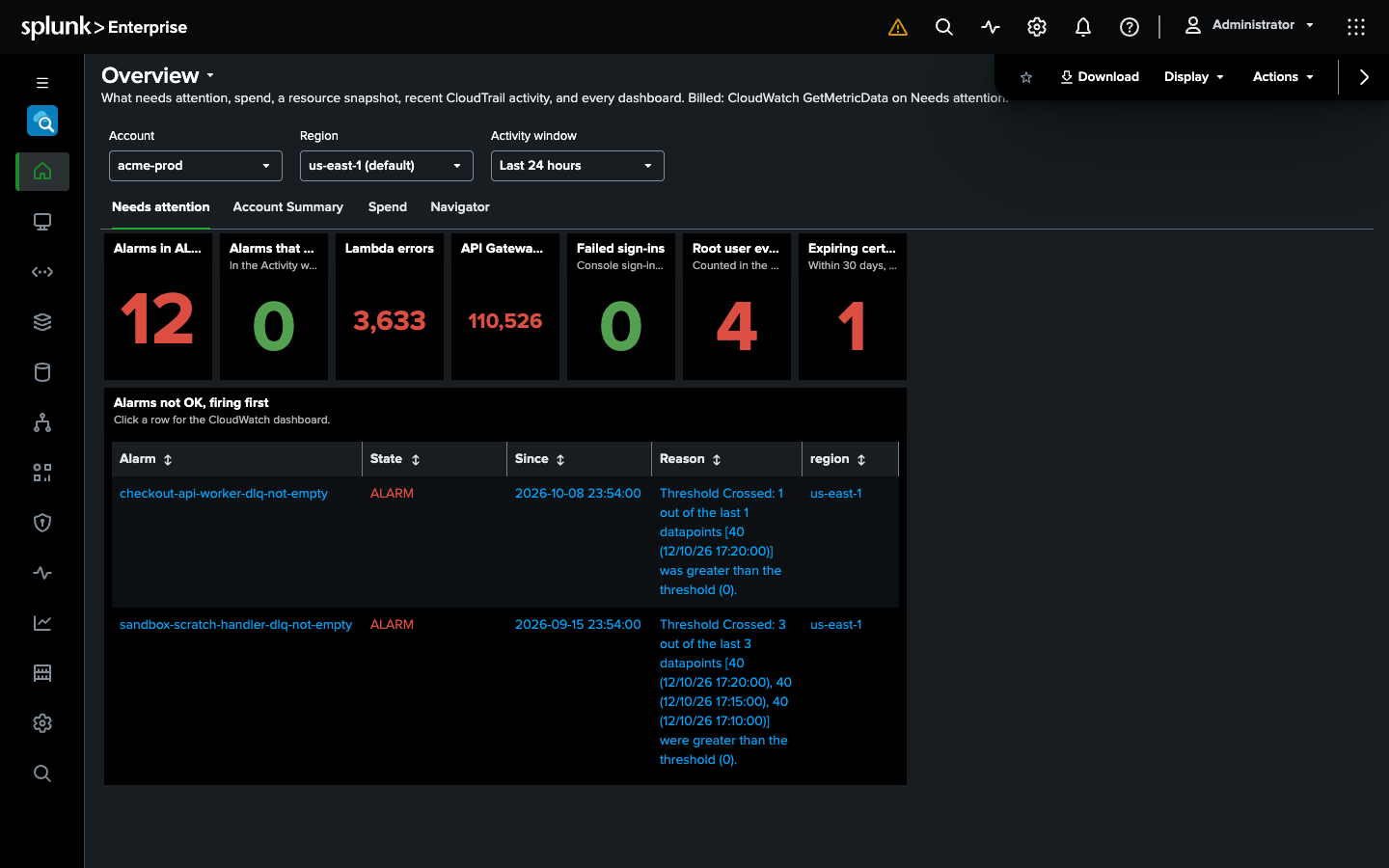
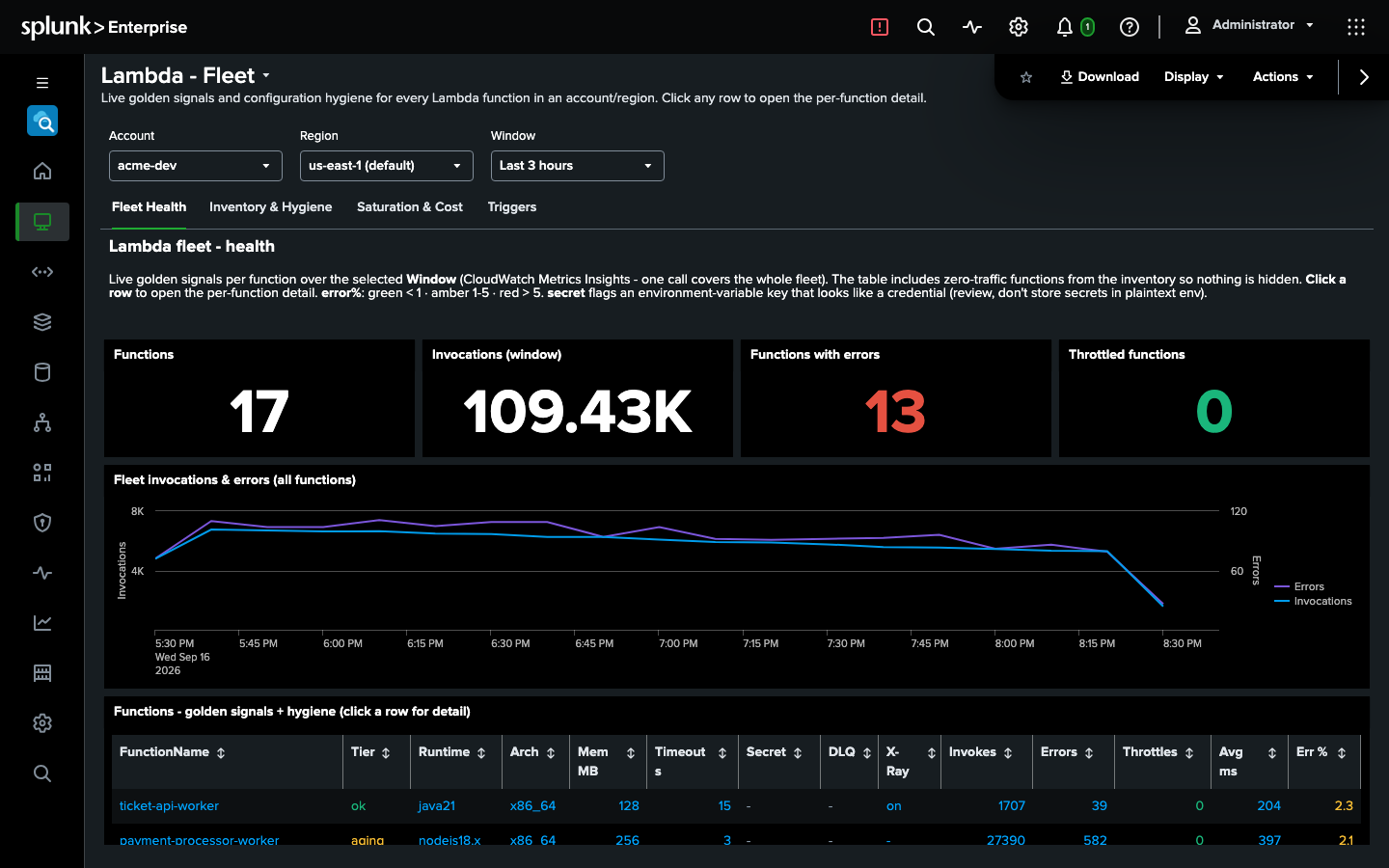
More than thirty dashboards come with the app, grouped the way the AWS console groups its services: compute, networking, storage, databases, application integration, analytics, security, observability and management, each with a page per resource. The Overview opens on what needs attention - alarms firing, Lambda errors, API Gateway 5XX, failed sign-ins, root user activity, certificates about to expire.
Metrics Explorer, Log Tail and Logs Insights work the way their console counterparts do, and the CloudTrail pages start from the signals that should worry you: root activity, sign-ins without MFA, principals hitting AccessDenied.
Your credentials, your boundary
Register an account on the Setup page with long-lived access keys, a cross-account role to assume with an external ID, or the EC2 instance role on a self-managed search head. Secrets go into Splunk’s encrypted credential store, never into a conf file. Analysts who should search as themselves can bring their own credentials, so each search sees what their own IAM allows.
AWS IAM stays the boundary: the app can only read what the identity behind it may read, and the IAM policy in the docs only reads, apart from the one S3 bucket where Athena writes its query results if you use | awsathena. By default, an assumed role’s session is named after the Splunk user, so the account’s CloudTrail shows who searched, not just that the search head did. Every change on the Setup page is recorded in _internal as well. See Access control.
Ingest-free, not free of AWS charges
Nothing is indexed, so Search for AWS adds nothing to your Splunk license. AWS still bills the API calls your searches make, as it would bill the same calls from the console or the CLI: CloudWatch GetMetricData, Logs Insights by the GB scanned, Athena by the TB, Cost Explorer by the request. The docs list what each command and each dashboard calls. A short cache keeps a repeated search from calling AWS again, the Cost & Usage dashboard runs only when you press Submit, and stopping a search stops its Athena, Logs Insights and CloudTrail work. See Costs.
Works with OS AI Agent
If you run OS AI Agent, an administrator can allow it to use the Search for AWS commands, so one investigation can join what Splunk has indexed with what your AWS accounts say right now.
Getting started
Search for AWS runs on a free tier with no license key: one account, with access keys or the instance role, on a standalone search head. A paid license adds more accounts, search head clustering, assumed roles and per-user credentials. To try those, ask us for an evaluation license.
It installs on the search head only, on Splunk Enterprise 9.4, 10.0, 10.2, 10.4 or 10.6, or on Splunk Cloud. A typical setup takes under ten minutes: install the app, attach the IAM policy from the docs, register an account, run | awsget.
- Docs: outcoldsolutions.com/docs/aws-search
- Splunkbase: splunkbase.splunk.com/app/10022
- Pricing and quotes: outcoldsolutions.com/pricing
Next: our monitoring apps, on October 26
Search for AWS is the last of the three search-head apps we brought to .conf26, after Kubernetes Search and OS AI Agent. Next up is a big one: on Monday, October 26 we release a major update of our monitoring apps and Collectord. We will write it up that day.
Try Search for AWS on your own accounts, and tell us what you would like it to do next - we would love the feedback.